Termly

Your term, one screen

Beta for IIM Ranchi MBA

Timetable, attendance quota, deadlines and friends' free slots in one installable app. Marks and ticks show the moment you tap, and on spotty Wi-Fi they wait on your device and sync in the background.

Free with your IIM Ranchi Google account. Opens with your last saved schedule when offline. An independent student project.

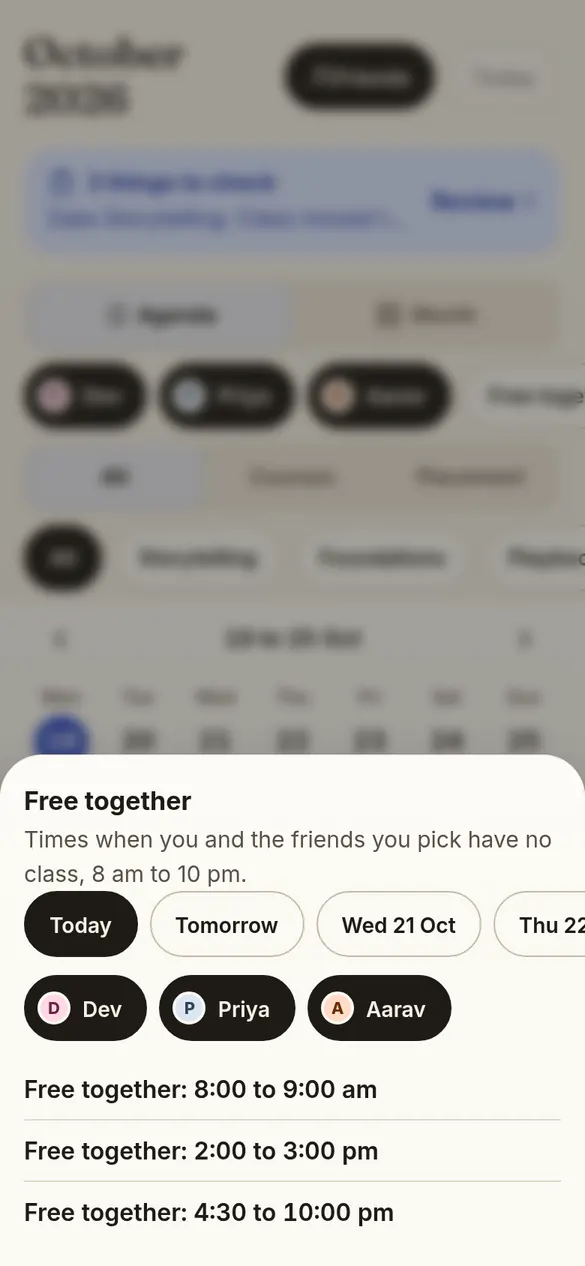
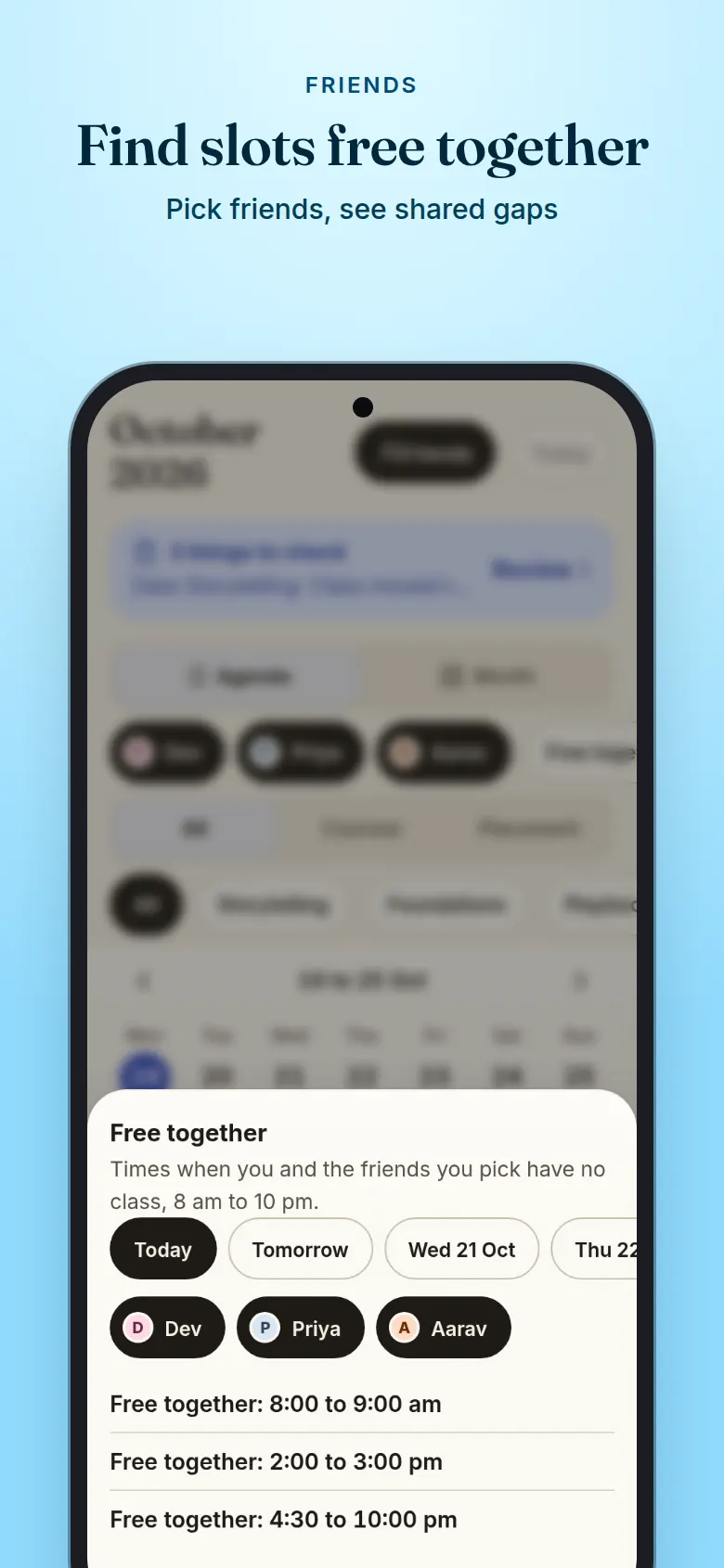
Find slots free together. Free together sheet: the times you and two friends have no class on one day.
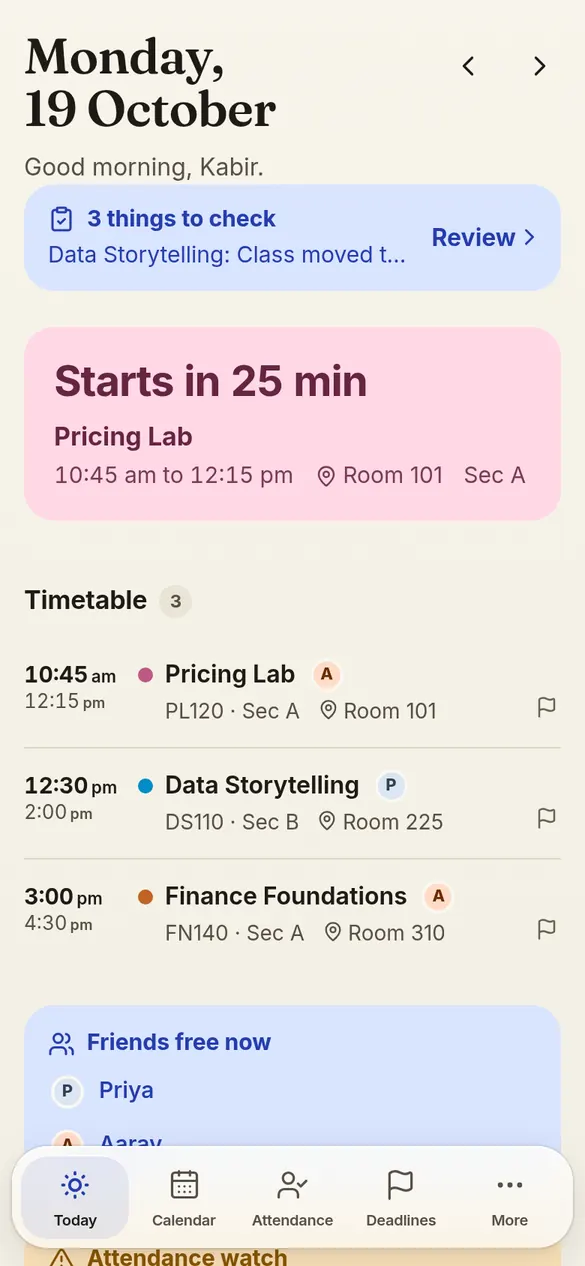
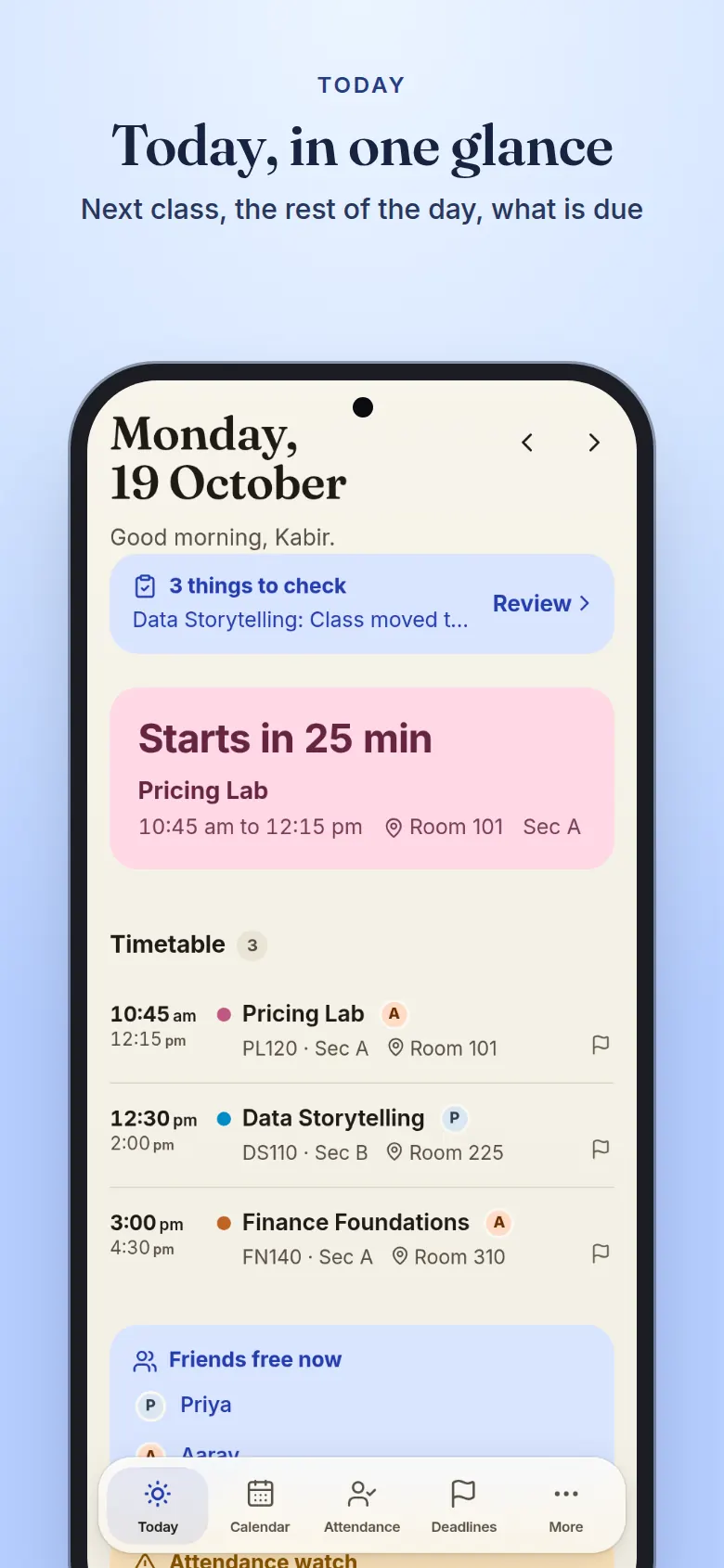
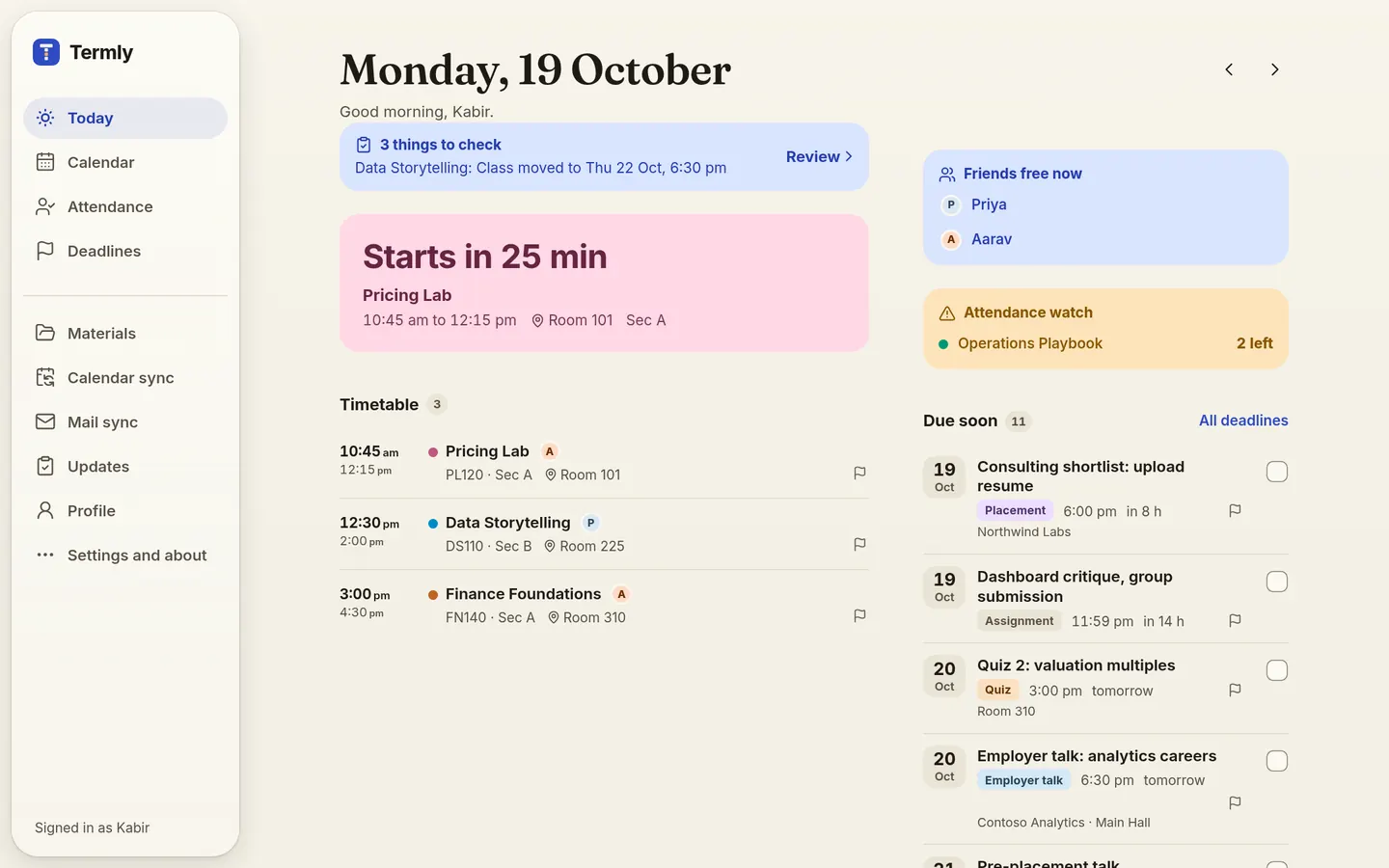
Today, in one glance. Today screen: the next class in 25 minutes, the rest of the day, deadlines due and friends free now.
  • 0.10.0Version
  • 1 Nov 2026Updated
  • FreeFor students
  • No adsIn the app
  • Spotty Wi-Fi okSaves on your device first
  • Install as an appAndroid, iPhone, laptop
  • 205 KBApp size

Beta for IIM Ranchi MBA students. App size is the first load, gzip, measured from the build.

About this app

Your timetable, attendance quota, deadlines and friends' free slots in one installable app. Marks and ticks show at once and sync in the background. Updates come from college mail, confirmed by classmates.

Read moreShow less

Open it in the morning and the next class is on top, with the room and a countdown, drawn from your saved copy while fresh data loads. Mark attendance in one tap and it shows at once, with 5 seconds to undo, along with how many absences you have left in each course. Placement deadlines, case competitions, quizzes and assignments sit in one list, sorted by when they are due.

When campus Wi-Fi drops, your marks and ticks wait on your device and send themselves once Termly is reachable again. Termly is free, has no ads, and is an independent student project, not built or run by IIM Ranchi. Always check official notices for anything that matters.

What's new

Latest 0.10.0 1 Nov 2026

8 added9 improved6 fixed

Added

  • Two ladders. Ranks run F, E, D, C, B, A, S, SS, SSS and EX; they show how much you contribute to the batch. Tiers run Copper, Bronze, Silver, Gold, Platinum, Diamond, Master and Grandmaster; they show how steadily you use Termly. Profile, How ranks work lists both with tonight's lines and what you need for the next step.
  • Tap a rank or tier chip for Why: on your own, how you got there and what is next; on someone else's, only the word, streaks and badges.
  • Helped the batch on Profile counts your answers, fixes and votes on ideas, with each rule, its points and its limit in How ranks work. Objecting earns the same as supporting, and nothing is ever taken away.
  • A first-week flow: a preview of your roster, a card after your first mark, a push reminder offer after it, and one Finish setting up card instead of several.
  • Your features is grouped by area, with Essentials and Everything presets and Undo. New switches cover the Finish setting up card, Class questions on Today, the Progress card, Who else is in this course, Class history and Suggest a feature. Nothing is ever hidden for you.
  • Classmates can be sorted by Most in common or A to Z, and each person shows the courses you share. Tap a profile photo to see it large and zoom.
  • Attendance history: change a past mark from the course's class list, with Undo.
  • Change log in More: what changed in Termly, newest first, with the releases below it. It updates every day.

Improved

  • The ring round a photo shows the tier and the box round a card shows the rank, each with its own colour and a soft glow, in light and dark, and the chip always says the word. Badge colour themes are gone, since every rank and tier now has its own look.
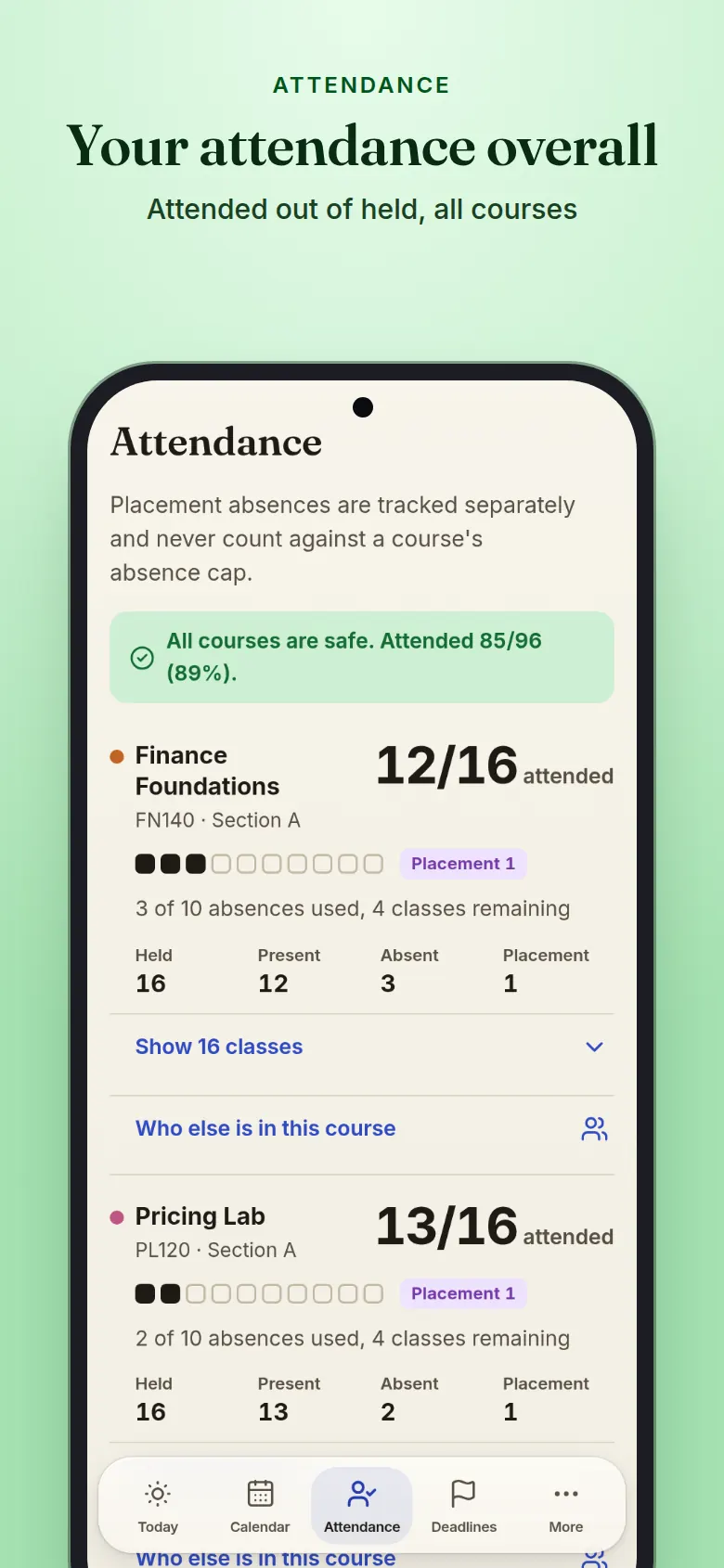
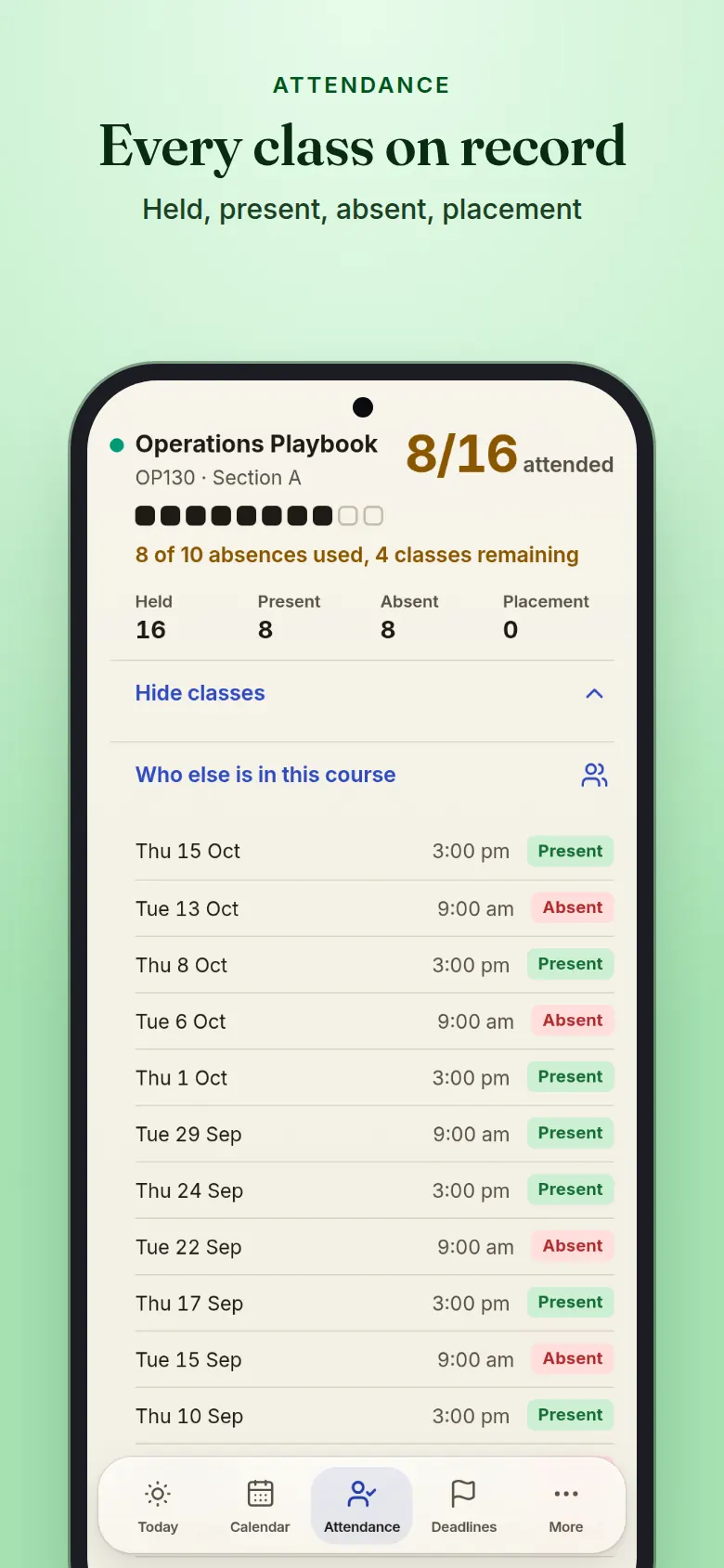
  • Attendance shows your overall percentage in the green banner, and Held, Present, Absent, Placement and Not marked sit on one tidy row on a phone. A class missed for placement counts as held but not attended.
  • More: Report an issue and Suggest a feature are one Feedback row. Refresh app and Notifications now appear in More only. The profile card is tighter on a phone, and Profile no longer repeats your photo or tier badge.
  • Profile photos stay sharp when opened and on avatars. The Friend and Request sent tags are pills like the rank chips, and a classmate's profile no longer draws the rank mark behind the Friend button.
  • Sign-in links you to your roll by your college e-mail when it can, so most people skip the roll screen, and a name typed in a different order or with a middle name missing still matches.
  • The sign-in screen, More and About say who manages Termly, by first name.
  • Mail: tapping Scan while a scan is running waits for it and shows its result.
  • Dates and times follow Ranchi time (IST) wherever your phone is set, so today, this week, countdowns and the greeting stay right while travelling.
  • The offline and slow-server banner is a rounded card, and messages say device, not phone.

Fixed

  • Report a problem, Shown twice, no longer says Invalid value; the report is accepted for a deadline shown on several sections.
  • Marks made offline no longer retry every moment; the wait grows and resets when you are back online. A device with a fast clock no longer shows every answer as saved data, and blocked browser storage no longer leaves a blank page.
  • Signing out waits for unsent changes that are seconds from saving, works when the browser blocks storage, and never shows the next student the previous student's saved answers.
  • Classmates: changing the sort no longer shows the old list under the wrong headings, and a long list no longer repeats a person or stops early.
  • Tiers, streaks and badges count only what you did in Termly, not marks imported from the old app.
  • Usage reports no longer drop events when the app is closed while one is sent.
Everything in Termly

Ten parts of the app, each on a real screen.

Today

Your day before you ask

Open Termly and the next class is on top, with a countdown, the room and your section. It opens from your saved copy and refreshes in the background, with the rest of the day, what is due soon and anything waiting for you to check.

  • Countdown to the class on now or next
  • Deadlines due in the next two days
  • A watch card for courses close to the cap
Today, in one glance. Today screen: the next class in 25 minutes, the rest of the day, deadlines due and friends free now.

Calendar

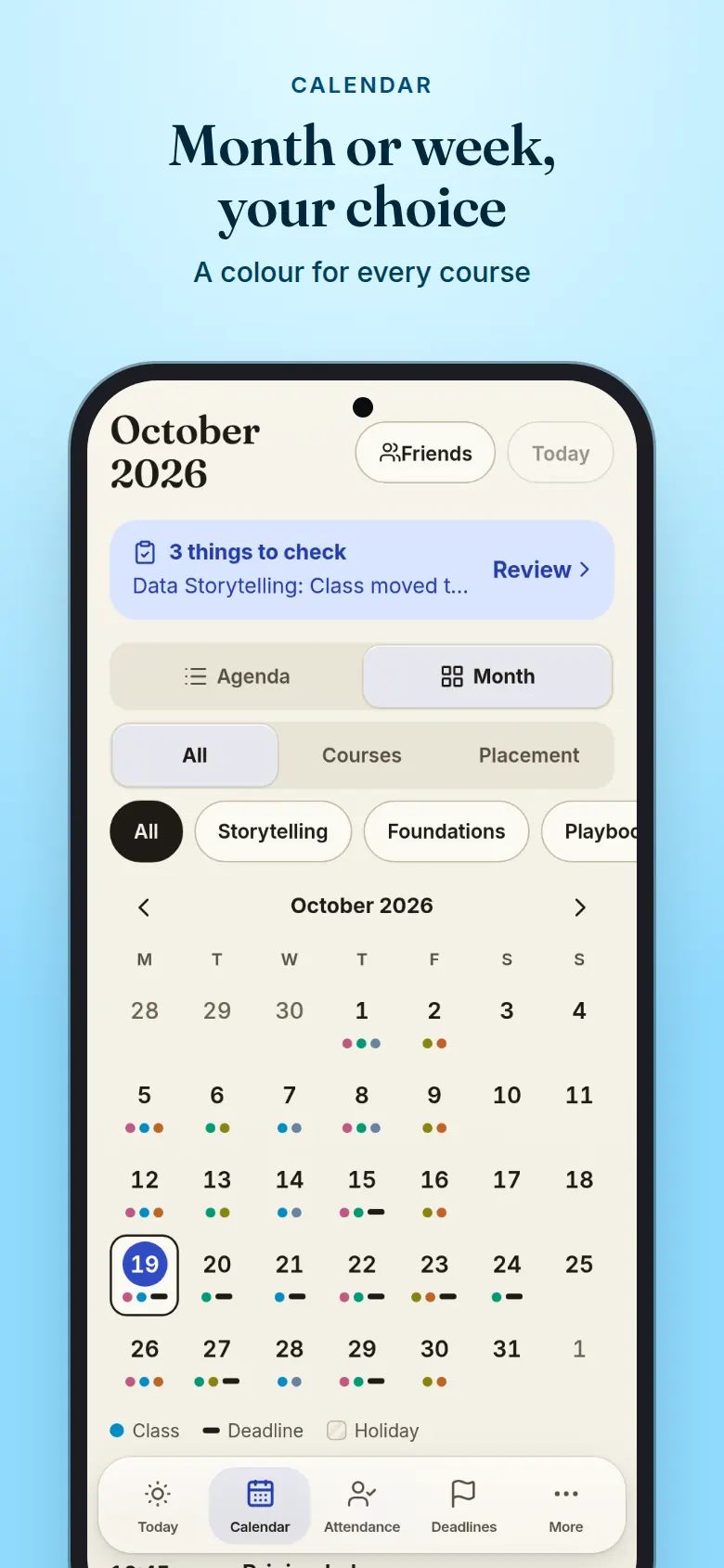
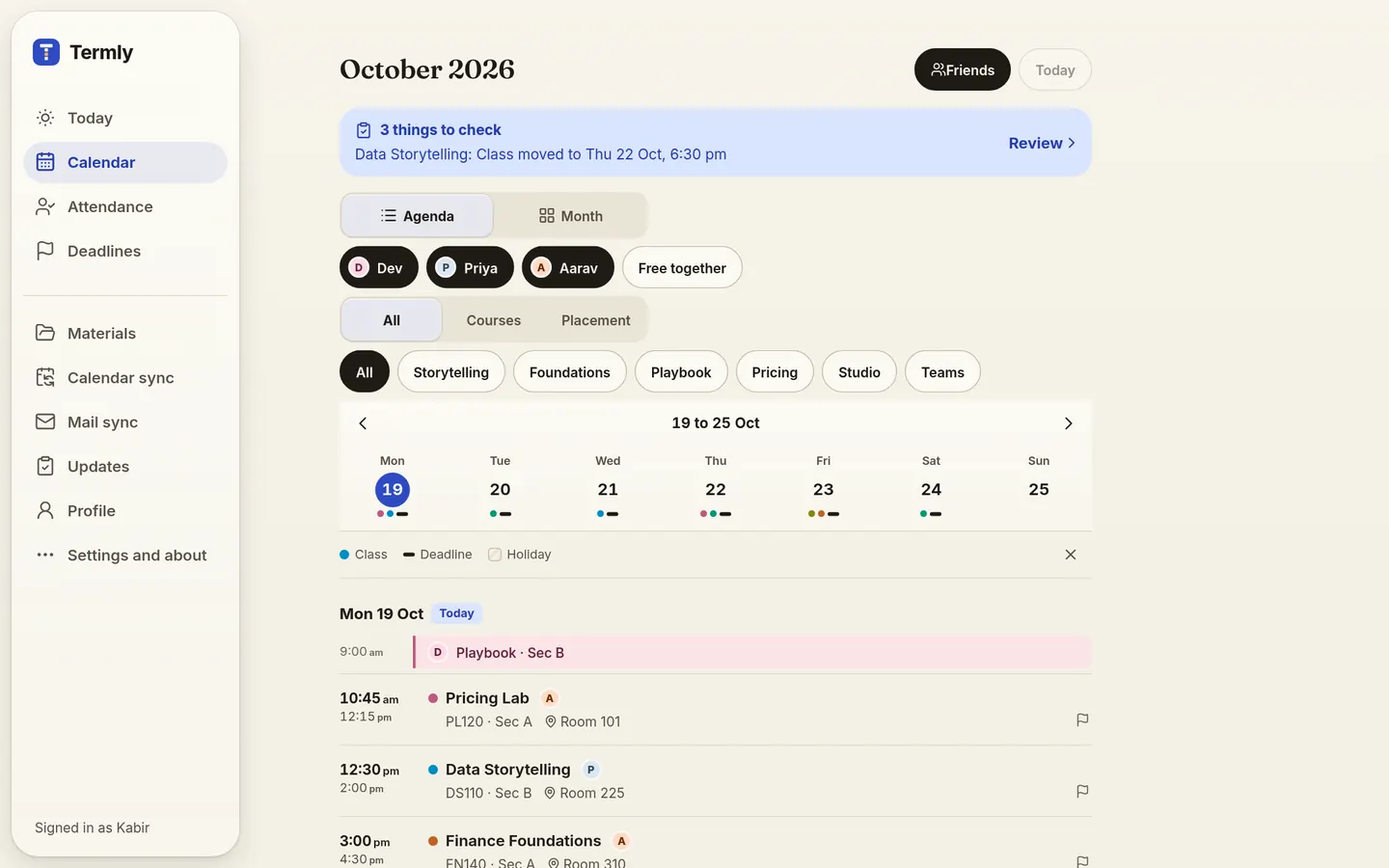
Week agenda or full month

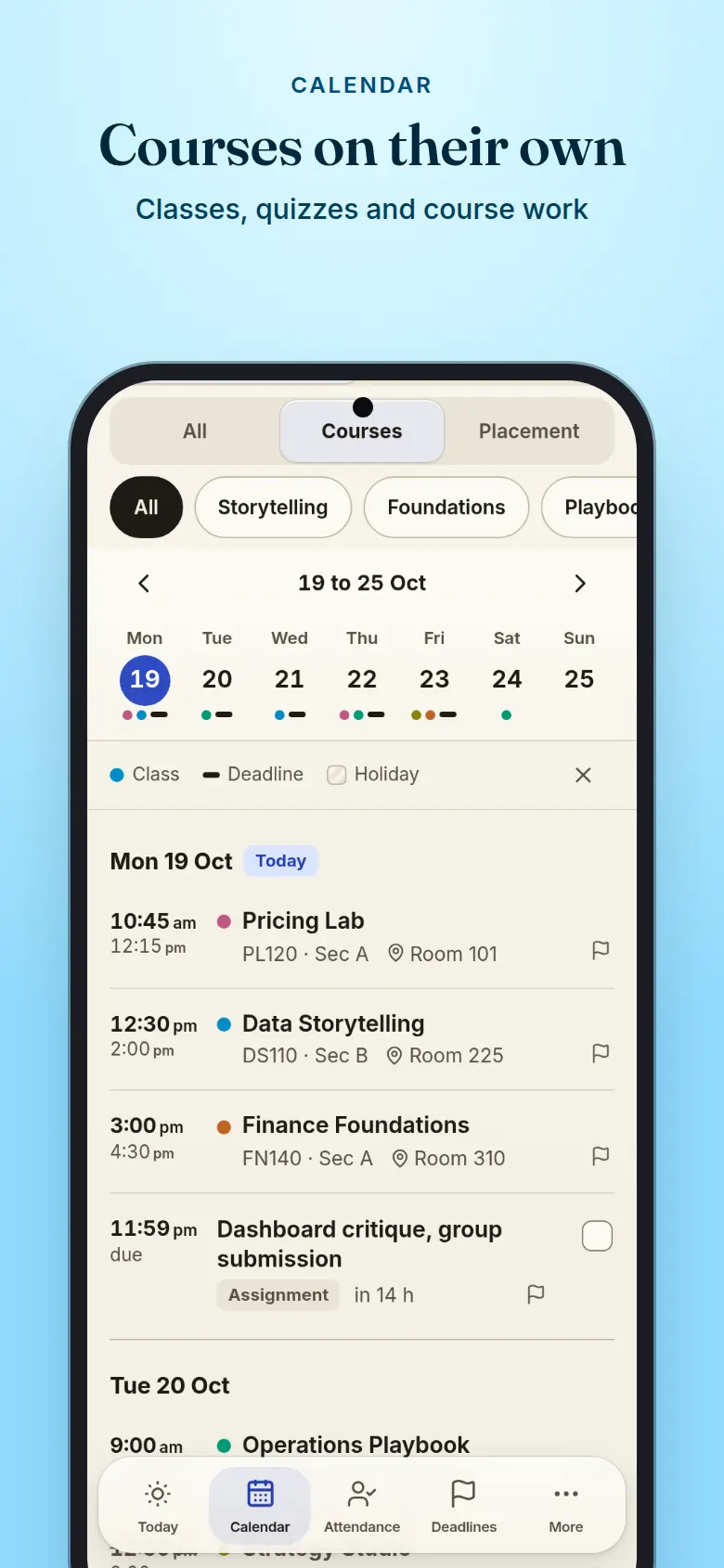
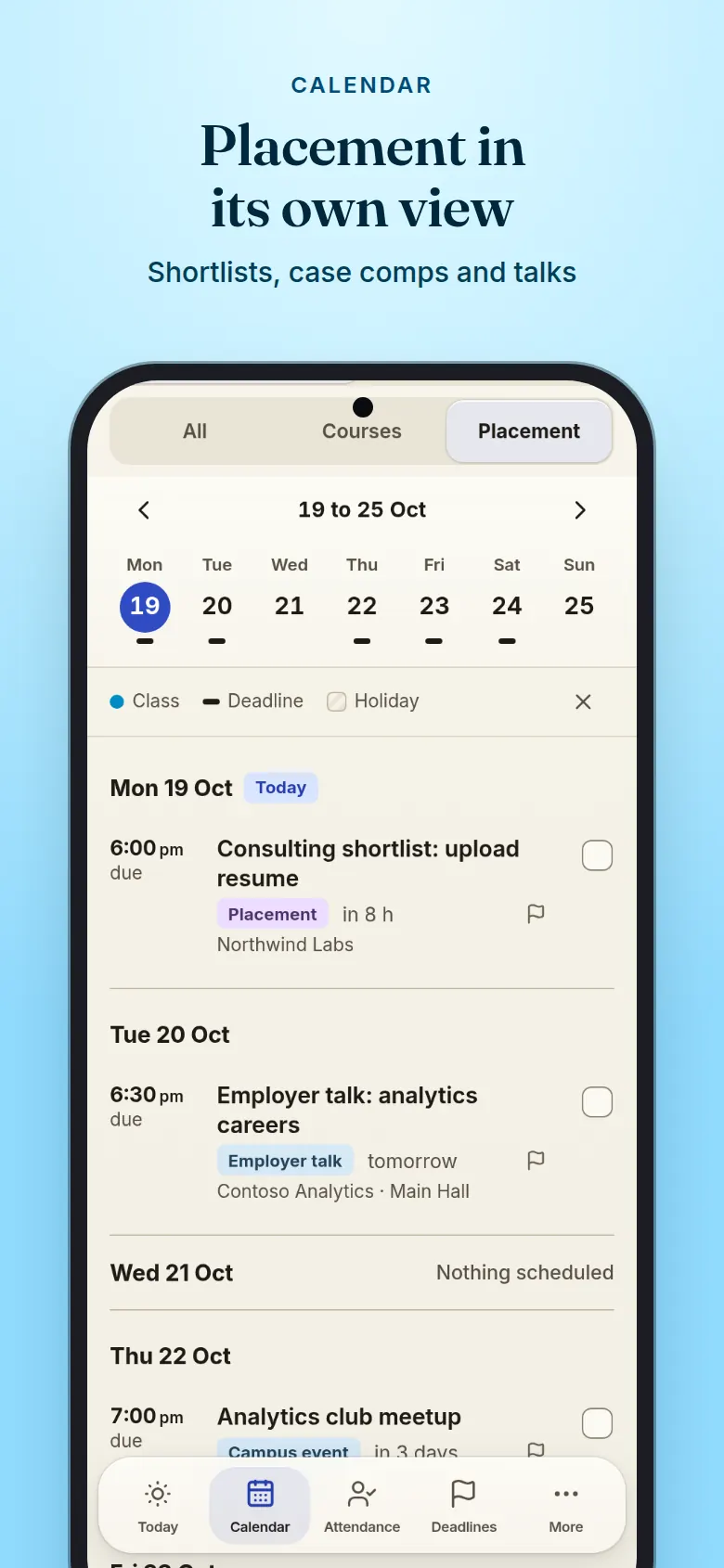
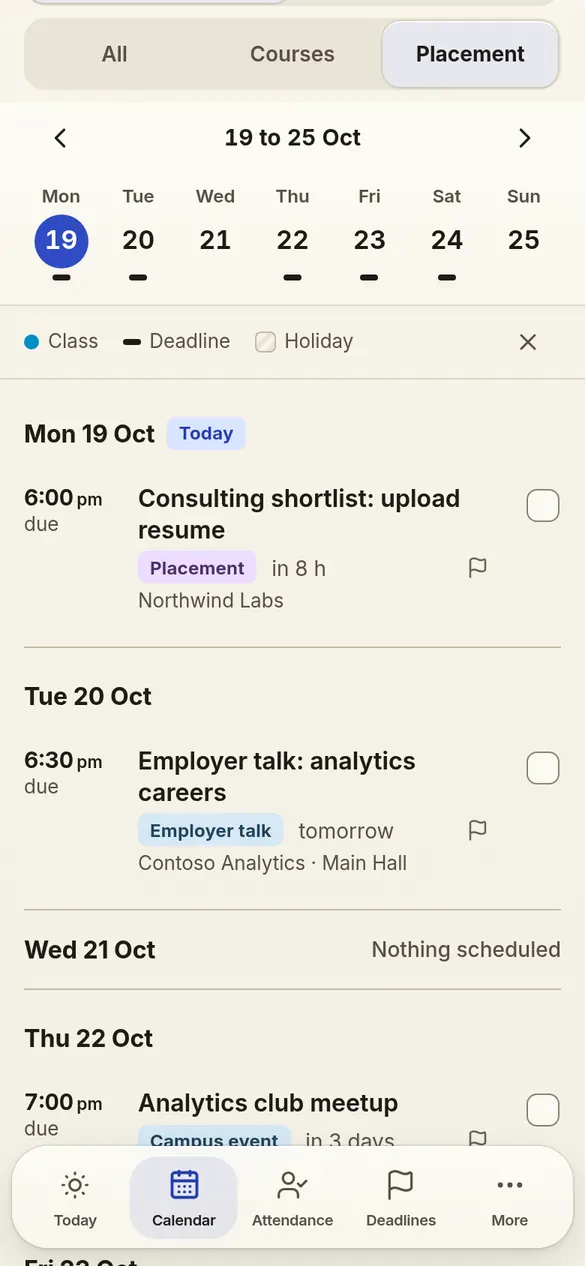
Flip between a week agenda and a month grid, with a colour per course and deadlines marked on the day. All, Courses and Placement keep classes and course work apart from placement, case comps and events.

  • All, Courses and Placement views
  • Month grid with holidays marked
  • Course chips to filter in one tap
Placement in its own view. Calendar week agenda in the Placement view: a shortlist deadline, an employer talk, a campus event and a case competition.

Attendance

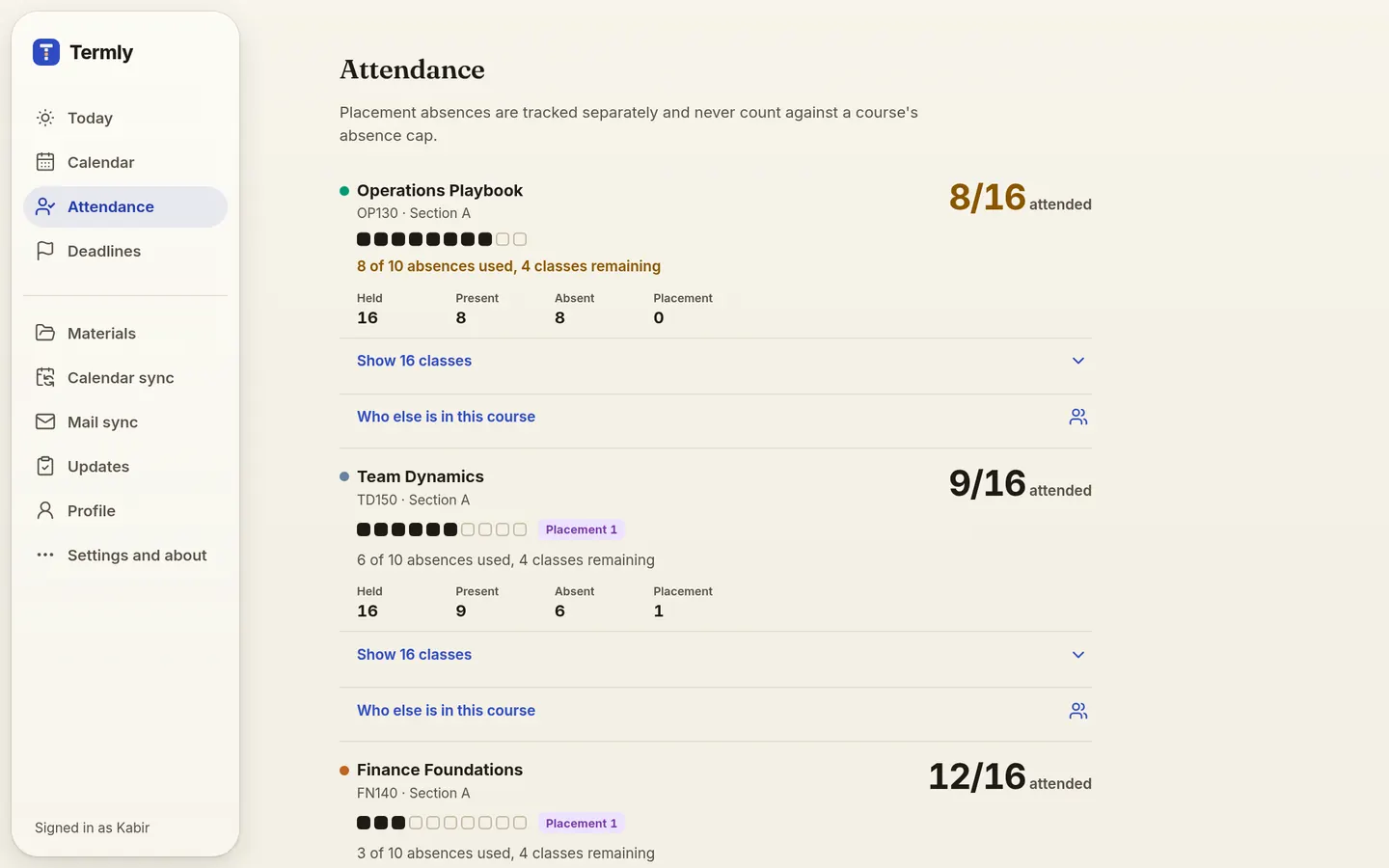
Attended out of held, no math

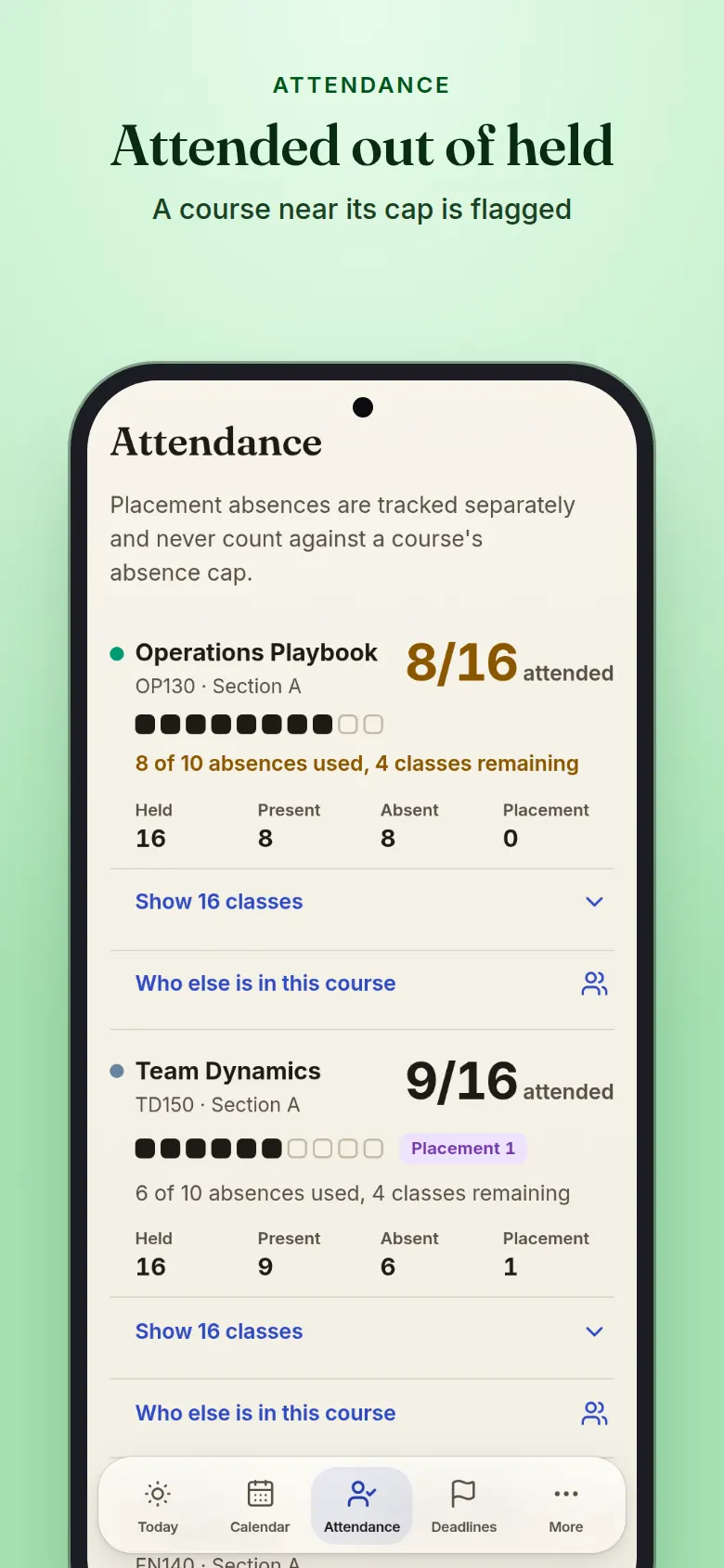
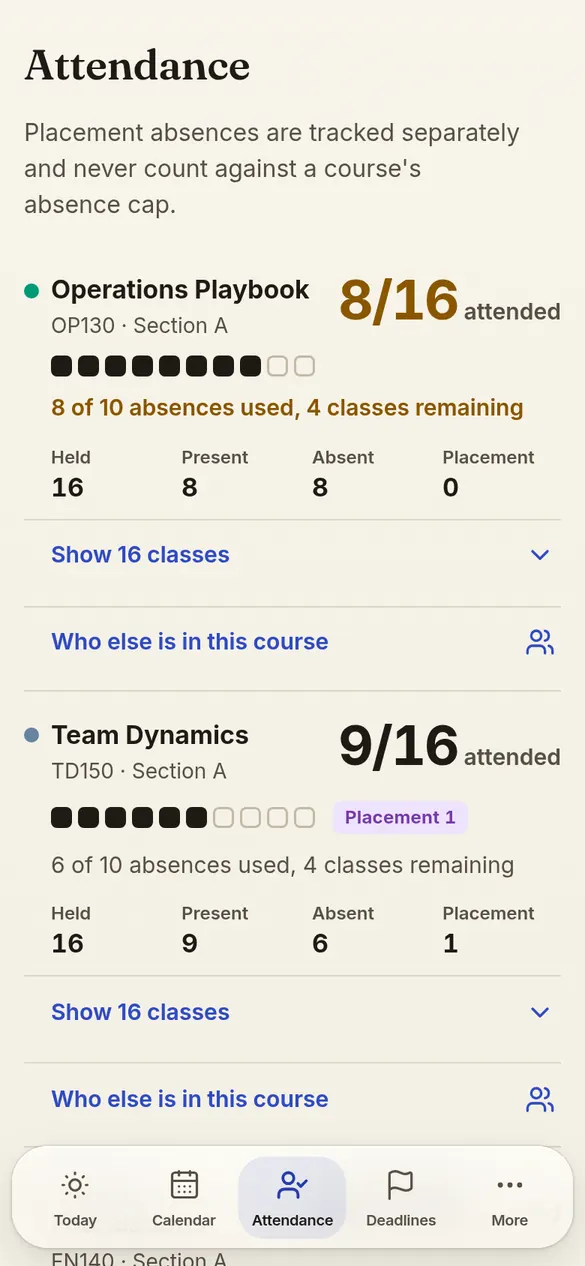
Mark Present, Absent or Placement right on the class, and Termly counts classes attended out of classes held, for each course and the term. A mark shows at once with 5 seconds to undo, waits on your device if the network drops and syncs when it is back. A course near its absence cap is flagged before you cross it.

  • Attended out of held, per course and overall
  • Placement days kept apart from the cap
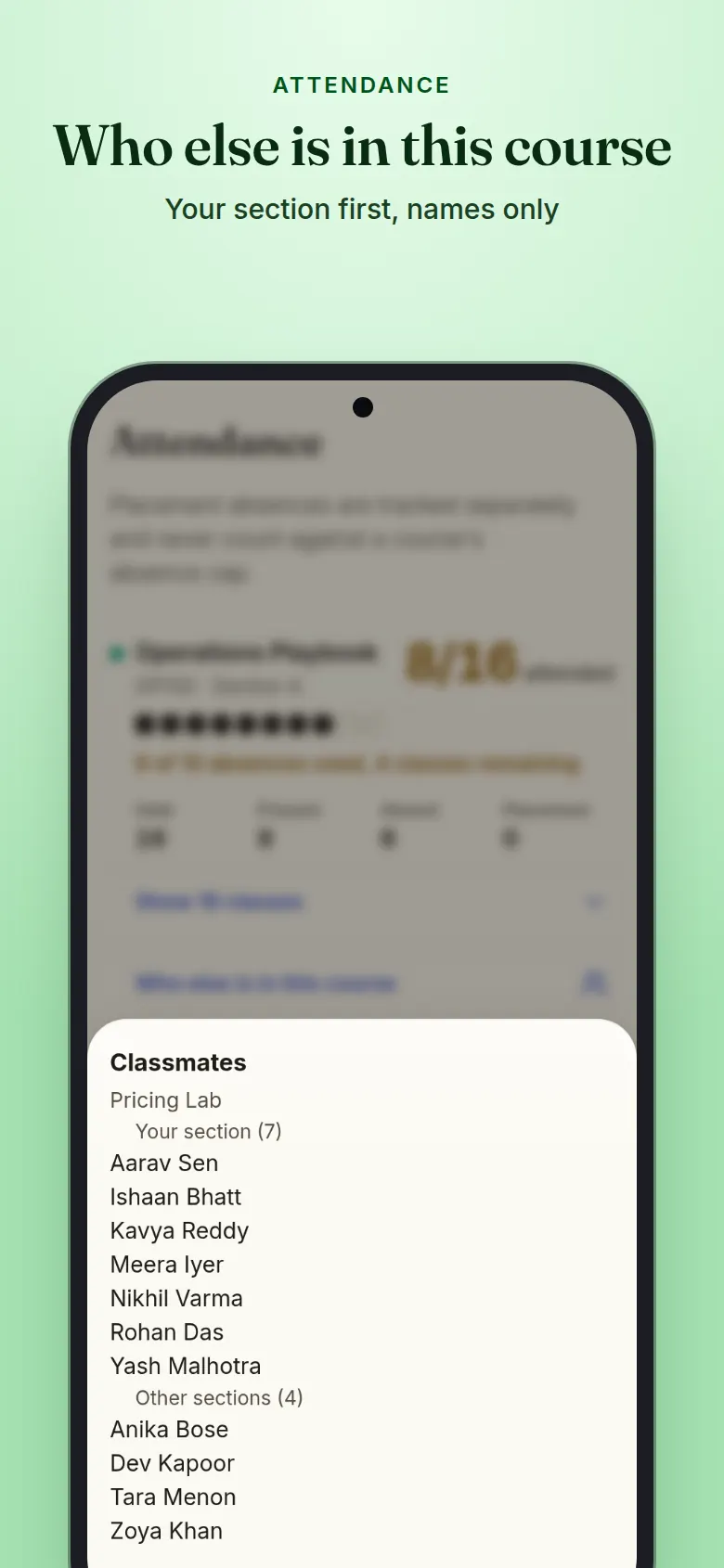
  • Who else is in each course, your section first
Attended out of held. Attendance screen: classes attended out of classes held for each course, one course flagged near its absence cap.

Deadlines

Every due date, one list

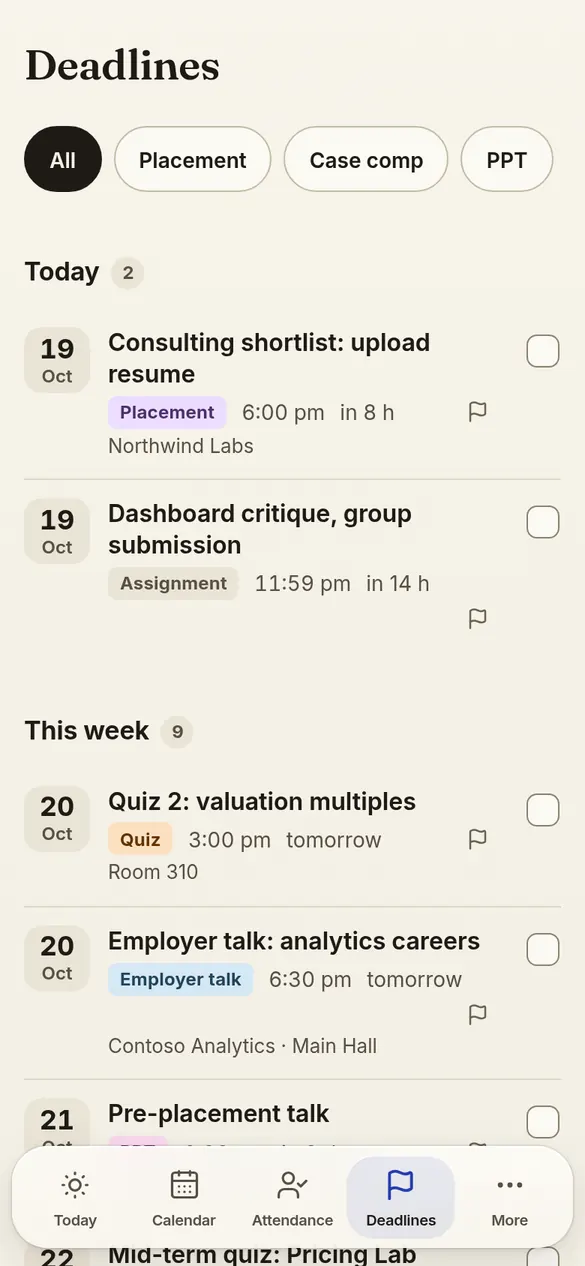
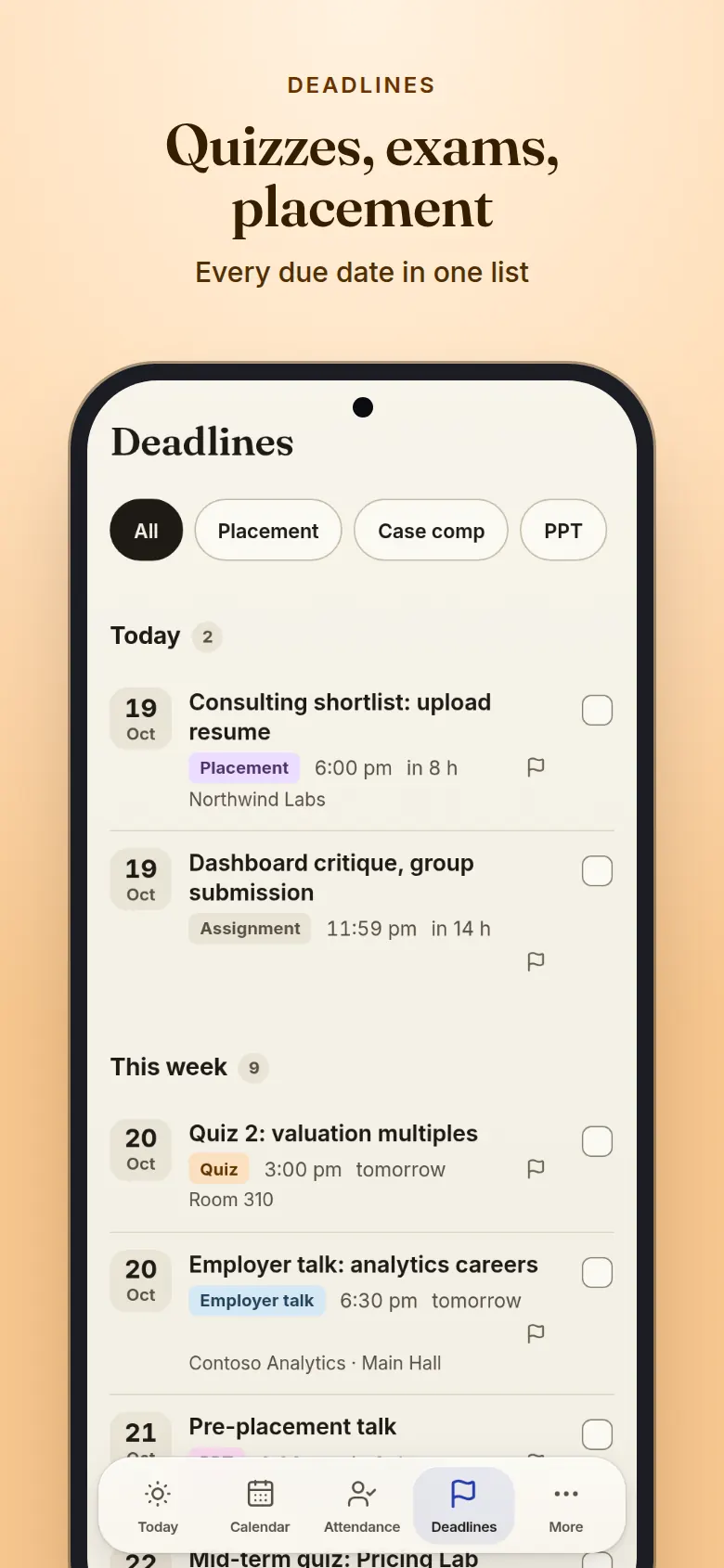
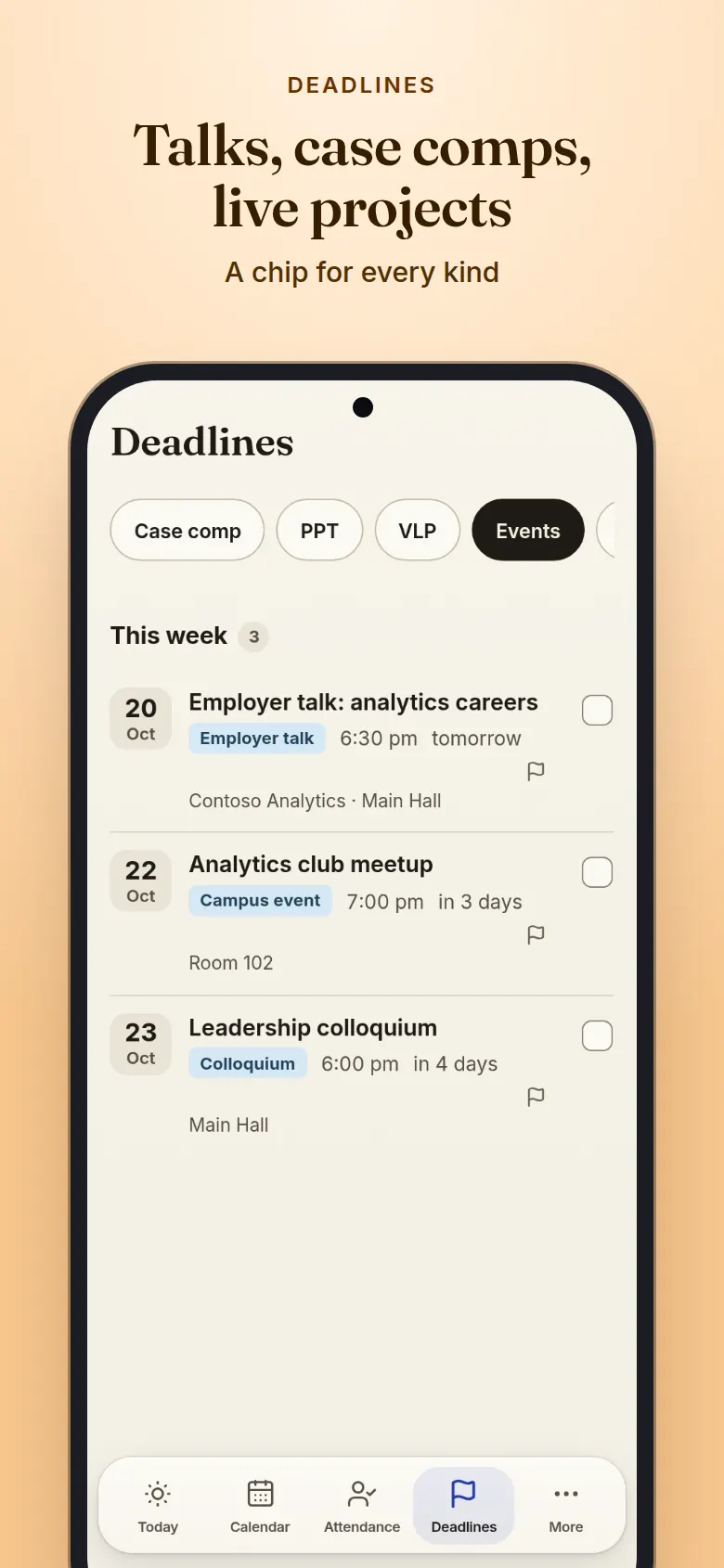
Assignments, quizzes, exams, case competitions, talks, live projects and placement deadlines, sorted into today, this week and later. Tick one off and it shows at once; with no network the tick waits on your device and syncs when you are back. Or filter to a single kind.

  • Chips for placement, case comps, talks and live projects
  • Overdue items called out on their own
  • Quizzes and exams from college mail added for you
Quizzes, exams, placement. Deadlines screen: assignments, a quiz, an exam, a case competition and placement deadlines by when they are due.

Updates

College mail becomes changes

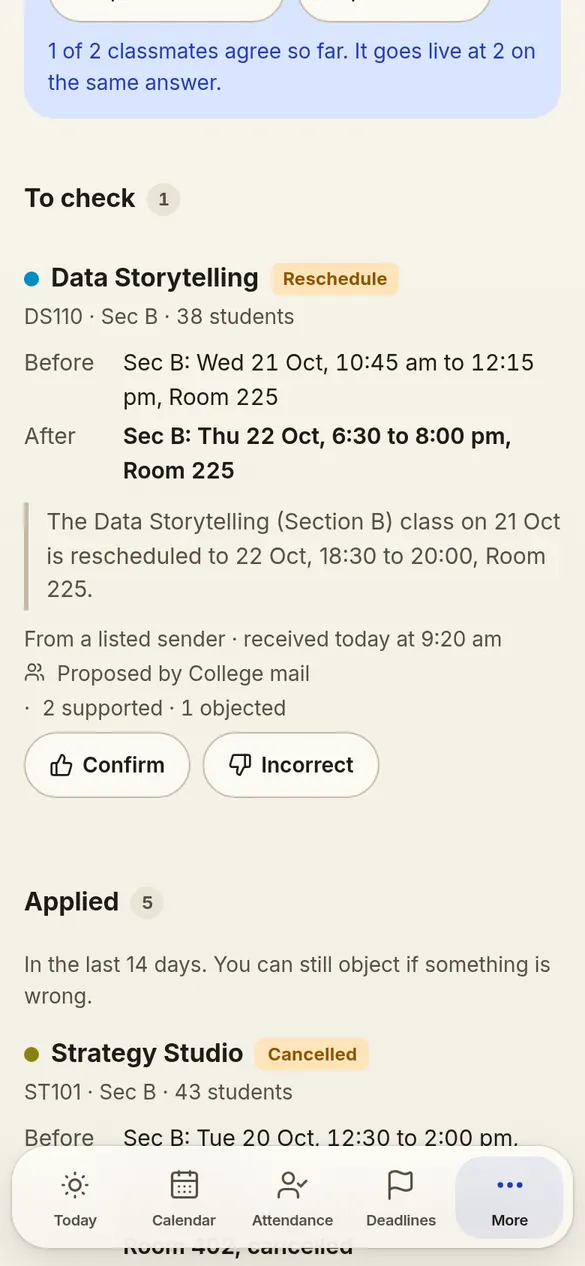
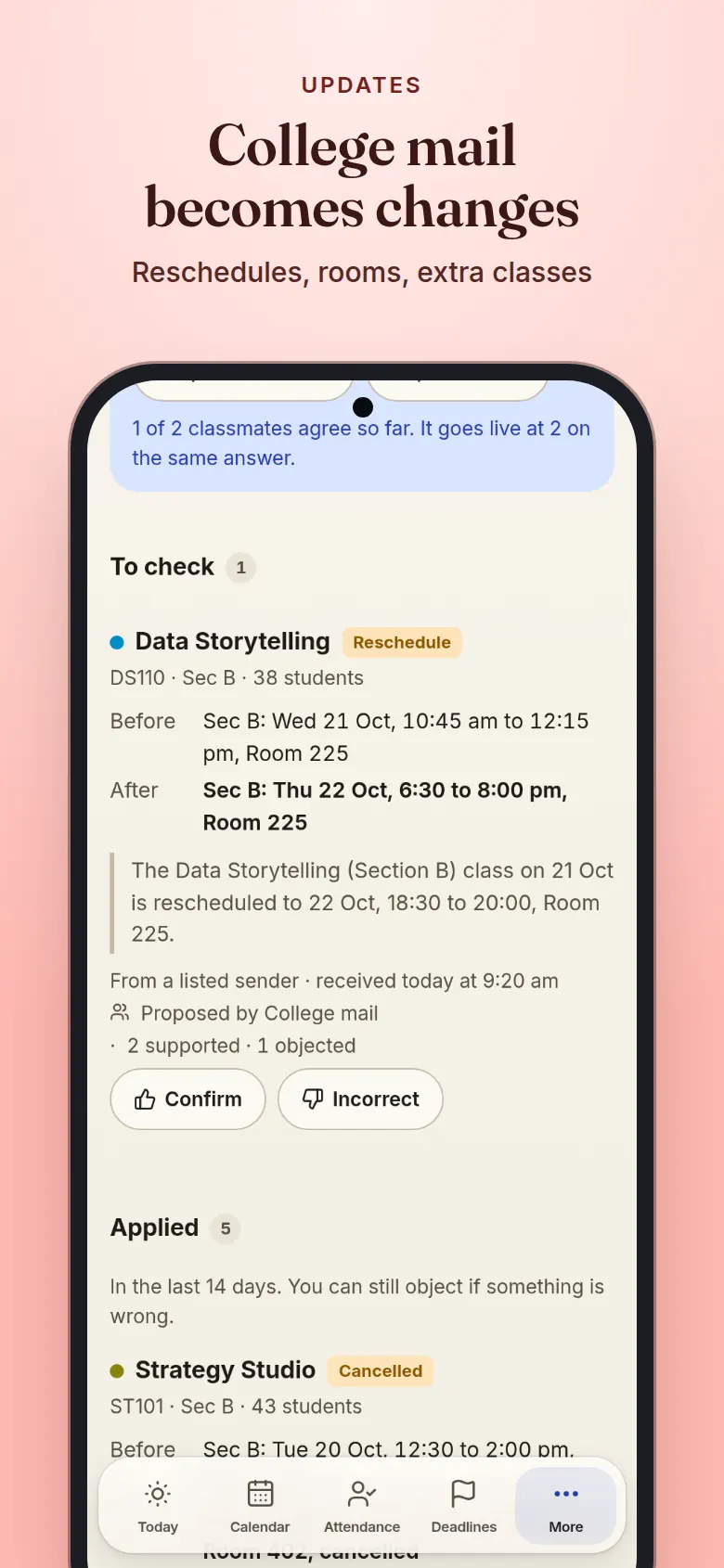
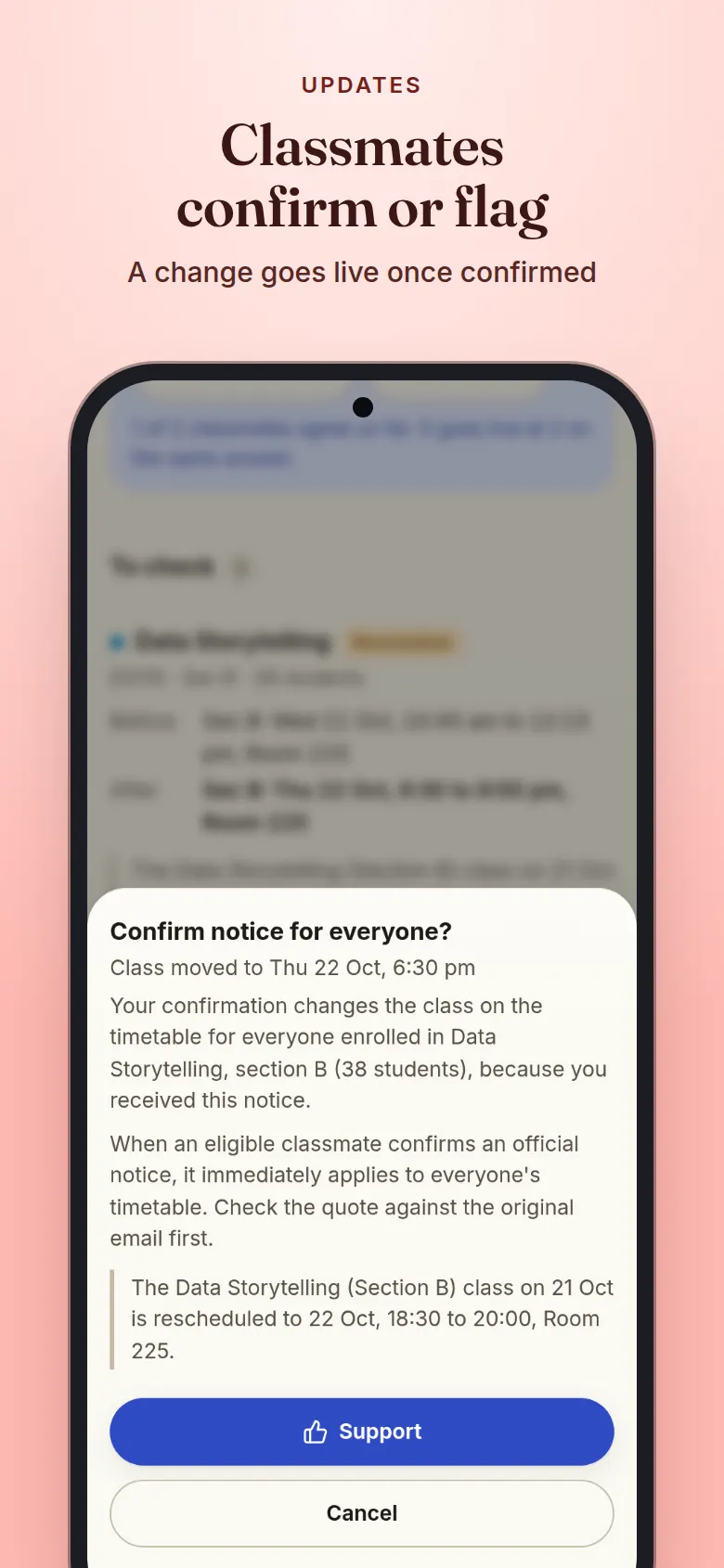
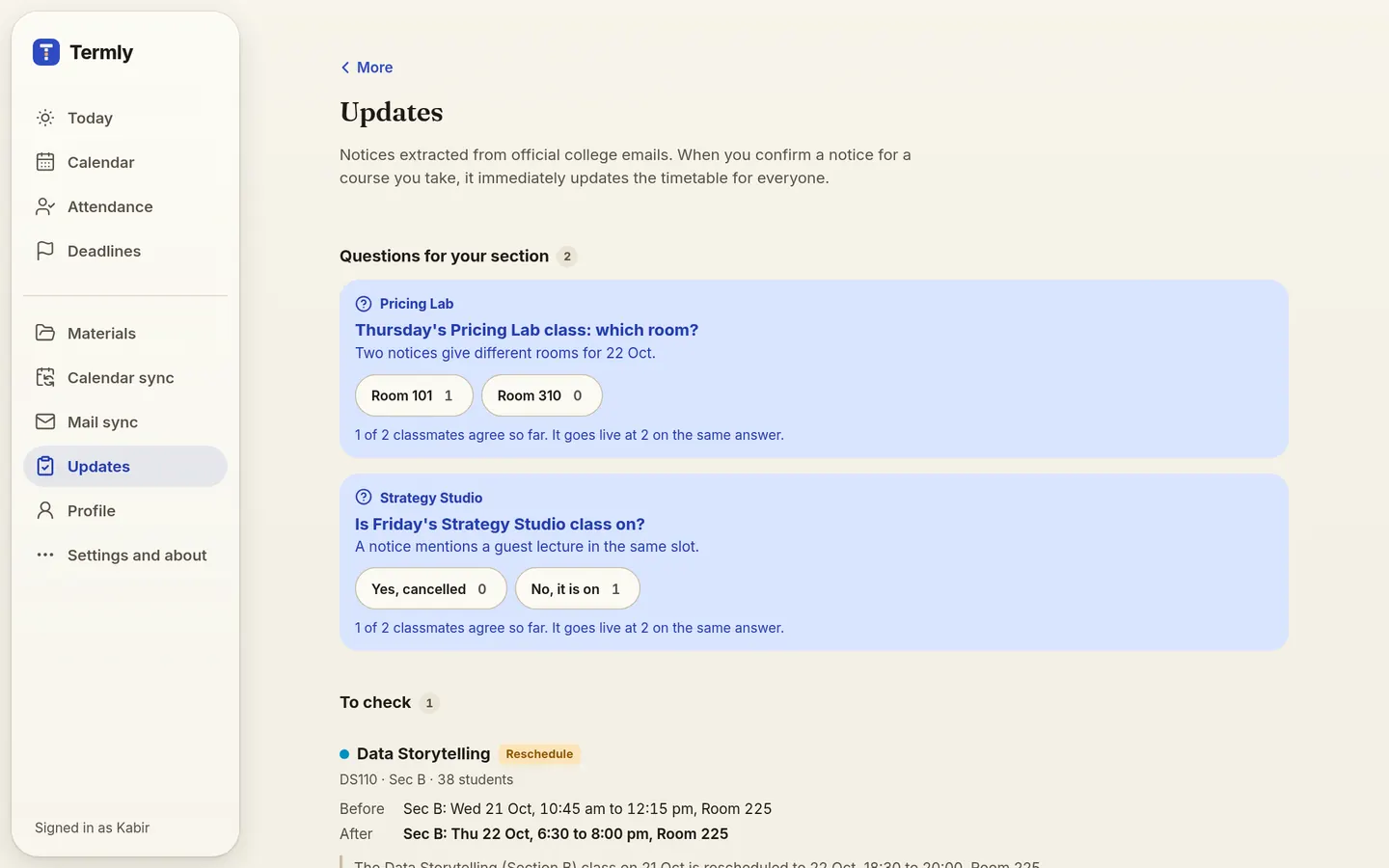
Reschedules, cancellations, room changes and extra classes found in college notices show up as changes to your timetable. A change goes live once a classmate who got the notice confirms it, and classmates can object.

  • Before and after for every class it touches
  • The quote from the notice, so you can check it
  • More objections than support undoes it for review
College mail becomes changes. Updates screen: a reschedule waiting for a classmate to confirm, then applied changes found in college mail.

Mail and calendar sync

Connect once, stay current

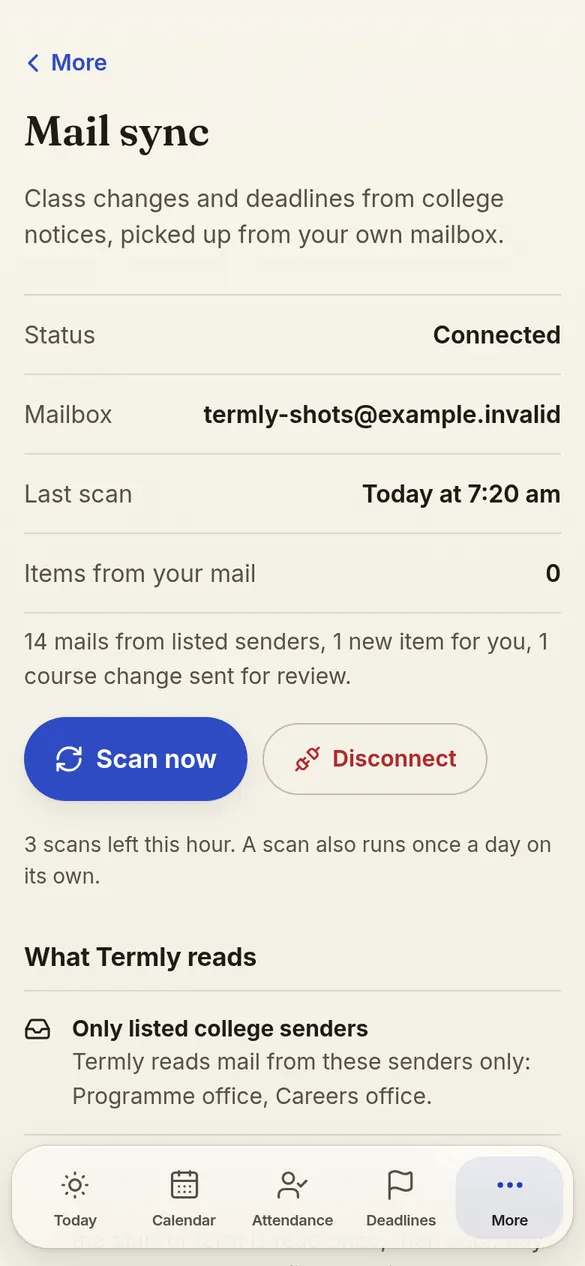
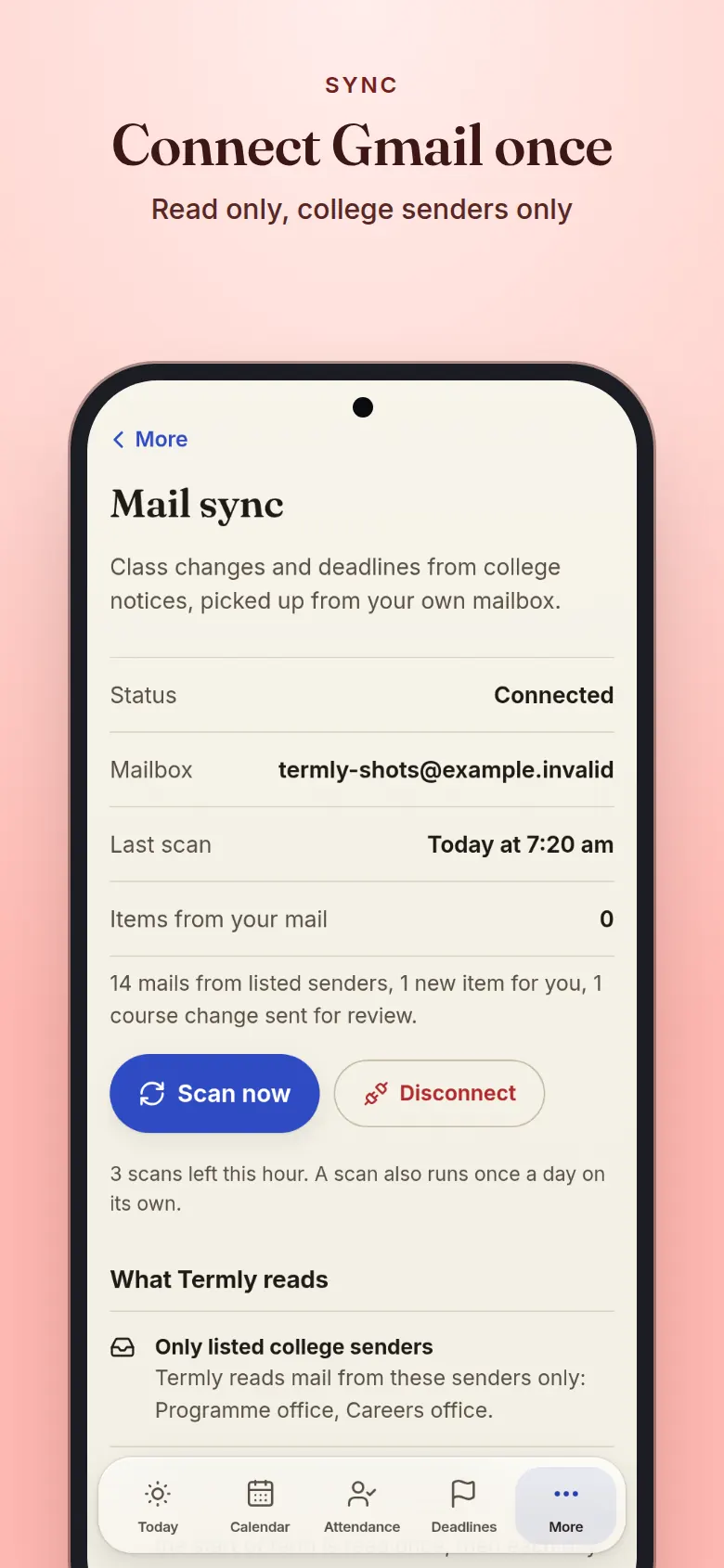
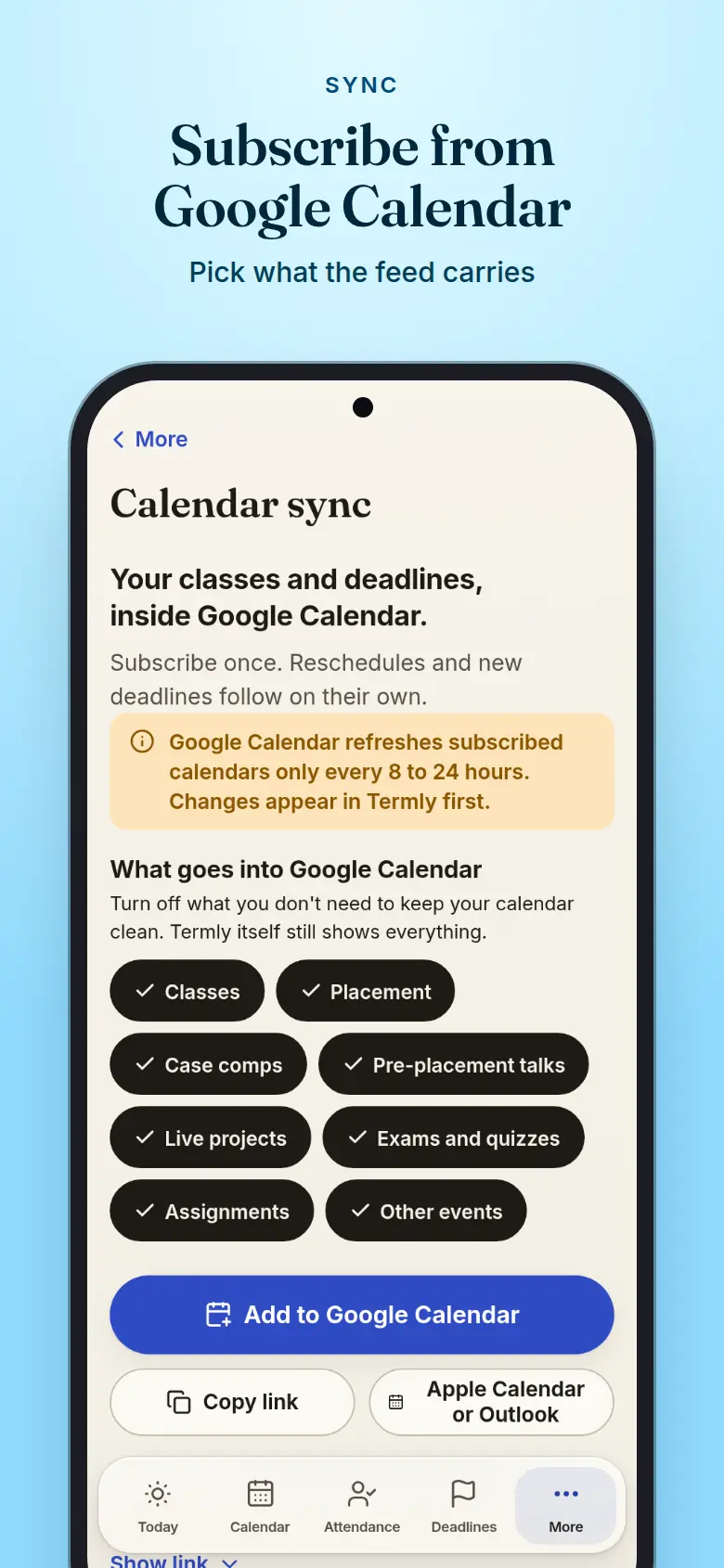
Connect Gmail read only and Termly reads notices from the MBA 2nd year office and the placement office, through the day. Add a private subscription link to Google Calendar, Apple Calendar or Outlook to see your classes there too.

  • Gmail read only, from listed college senders only
  • Group notice text is deleted after 30 days; mail sent only to you is not kept
  • Google refreshes the calendar every 8 to 24 hours
Connect Gmail once. Mail sync screen: Gmail connected read only, the college senders it reads and the last scan.

Friends

Friends, on your terms

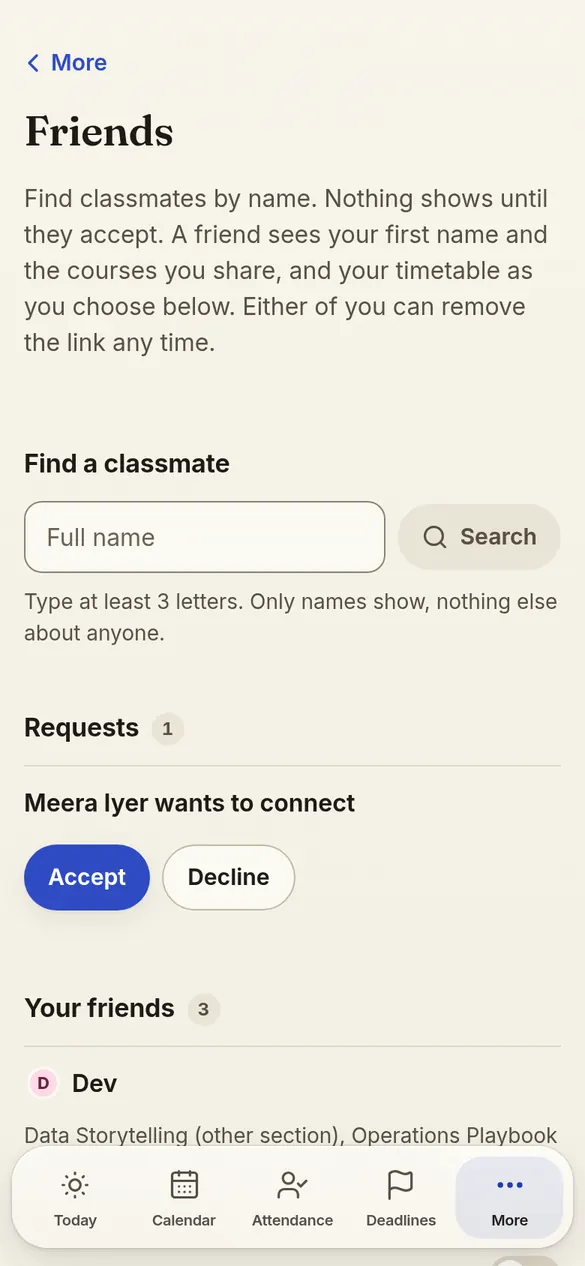
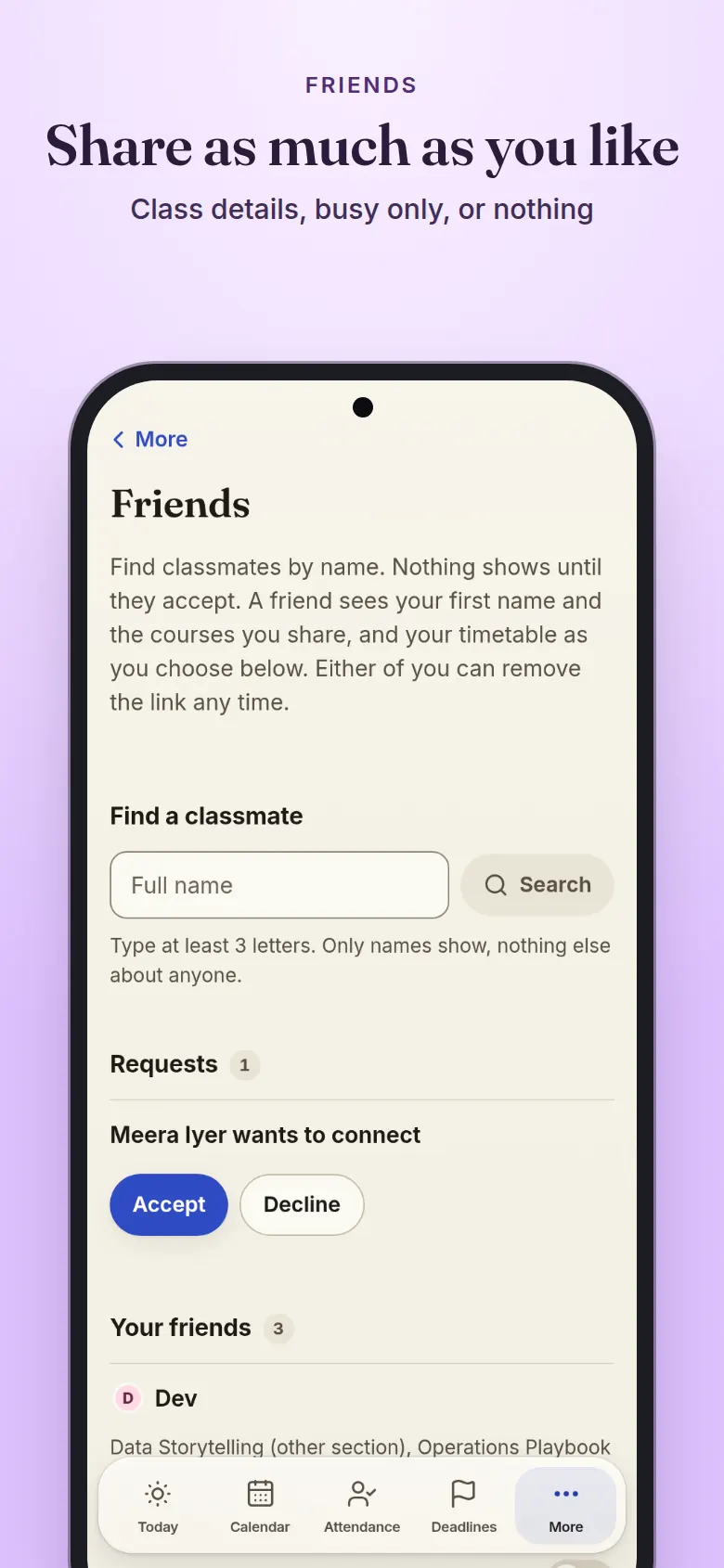
Find a classmate by full name and send a request; nothing shows until they accept. Choose what friends see of your timetable: class details, busy times only, or nothing at all.

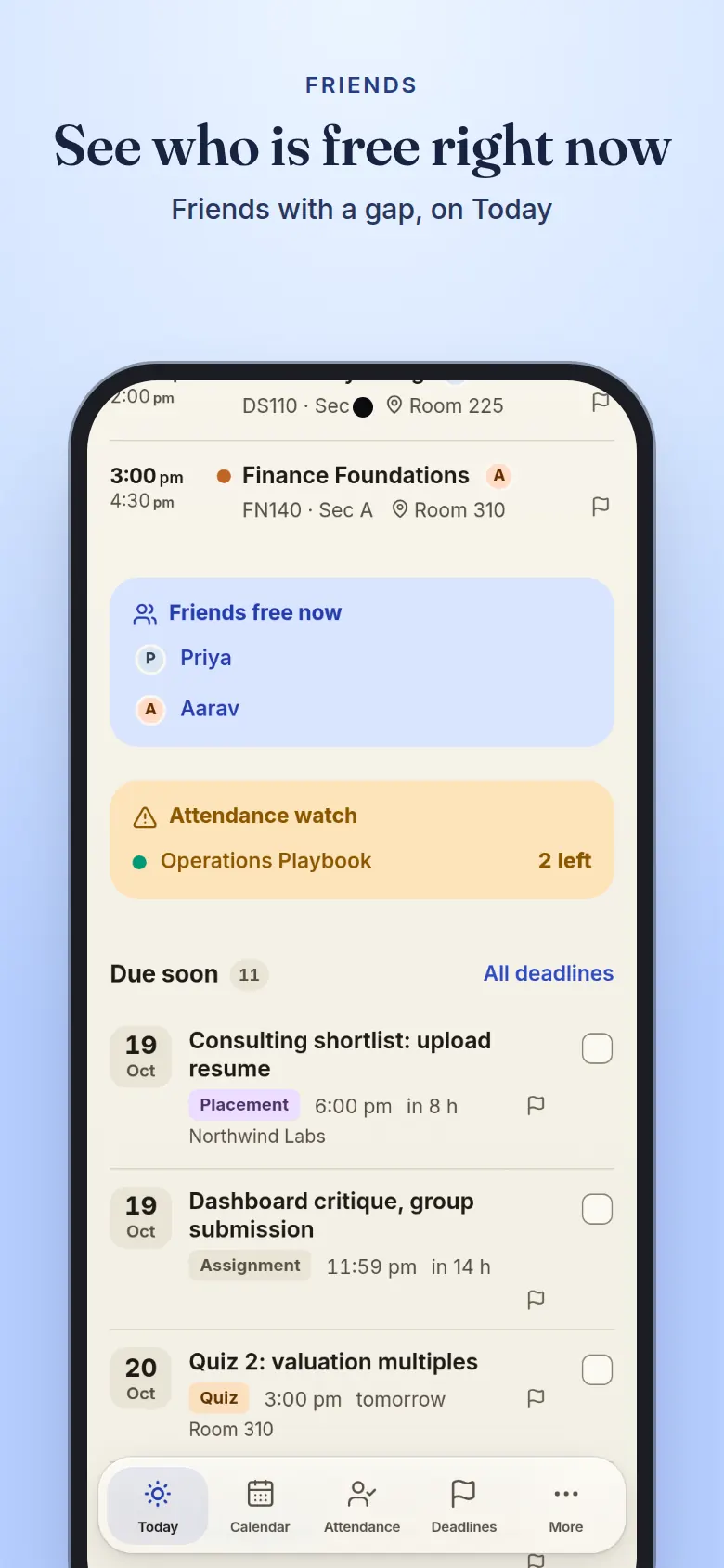
  • Friends free now, on Today
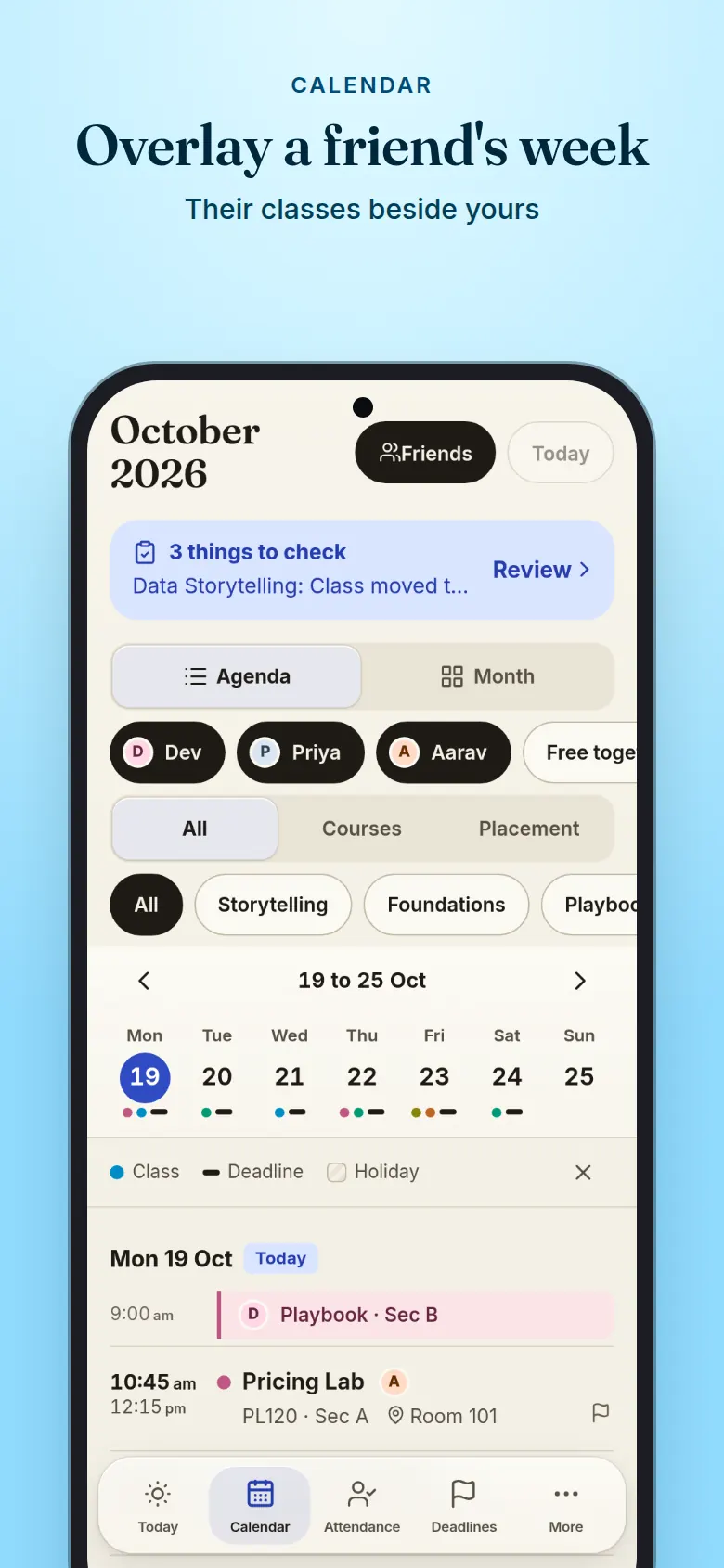
  • Overlay a friend's week on your calendar
  • Free together finds slots for a group
Share as much as you like. Friends screen: a friend request, three friends and the sharing levels for your timetable.

Notifications

Reminders that fit your day

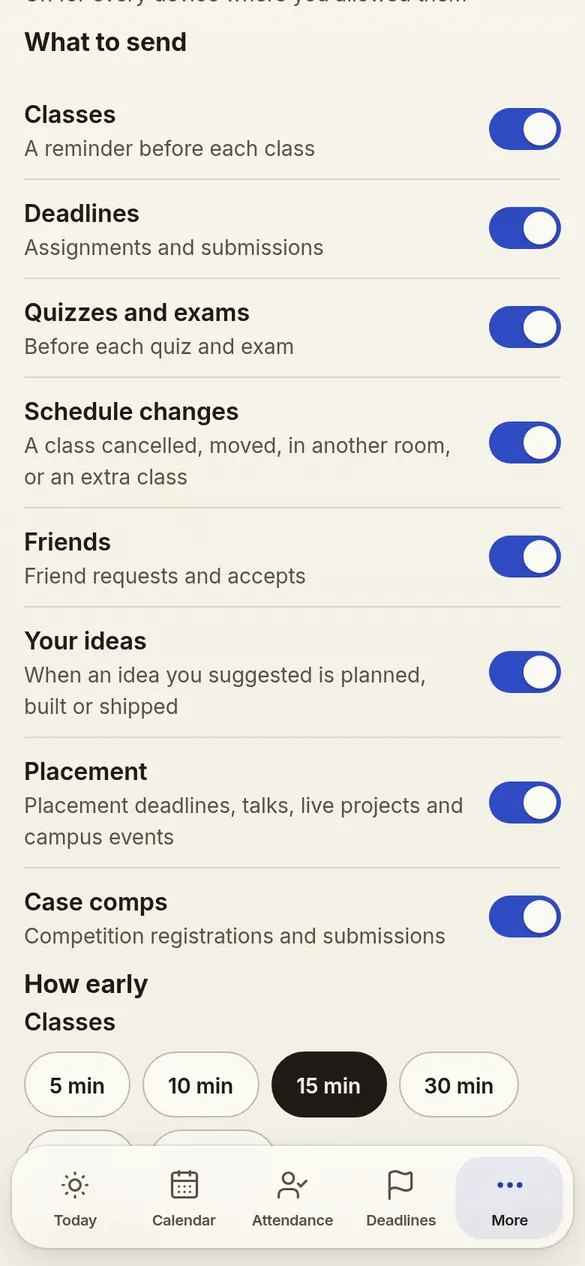
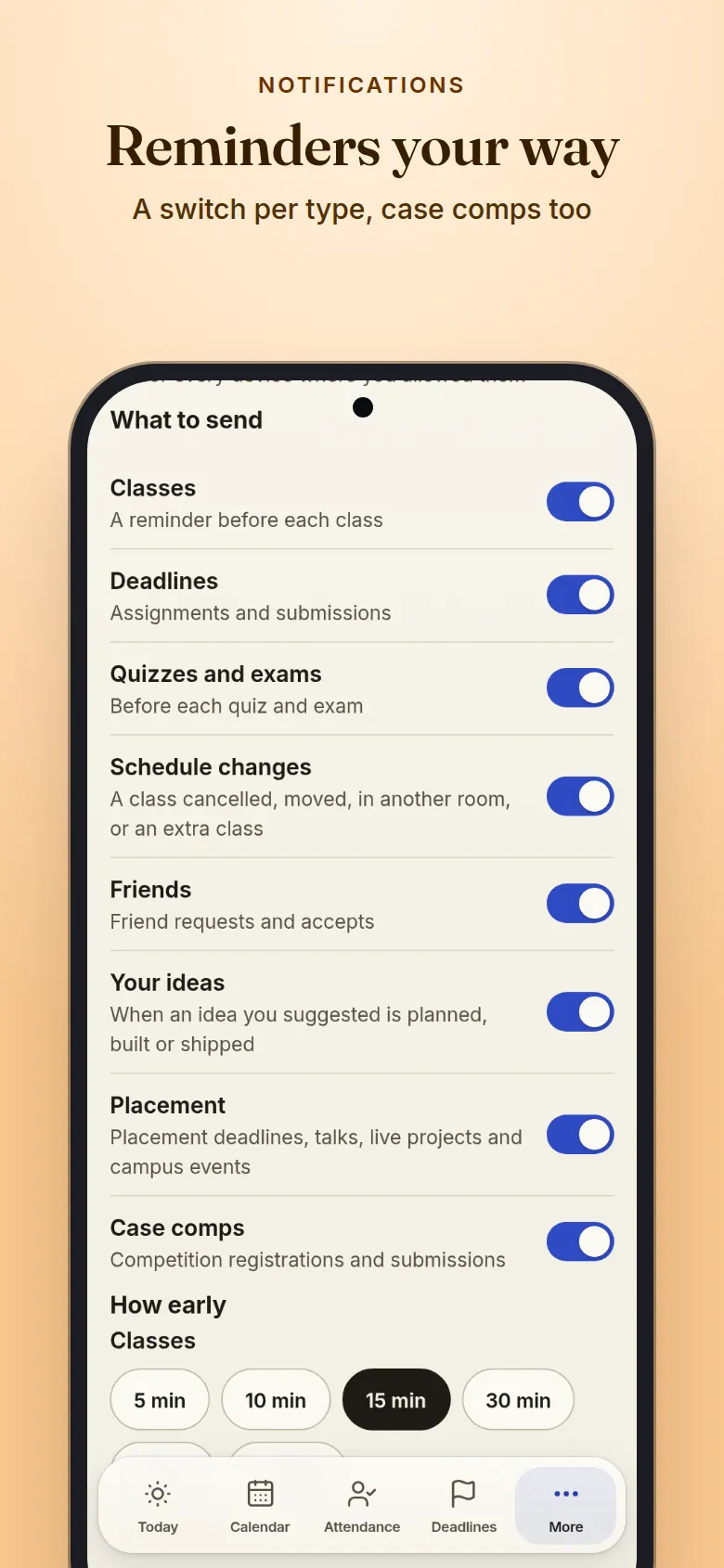
A heads-up 15 minutes before each class and deadline, or the lead time you pick. Alerts when a class is cancelled, moved or changes room, with quiet hours for the night.

  • A switch for each kind, case comps apart from placement
  • Quiet hours, and mute any one course
  • Optional: nothing is sent until you turn it on
Reminders your way. Notifications settings: a switch for each type of reminder, with placement and case comps apart.

Ideas and questions

Built with your batch

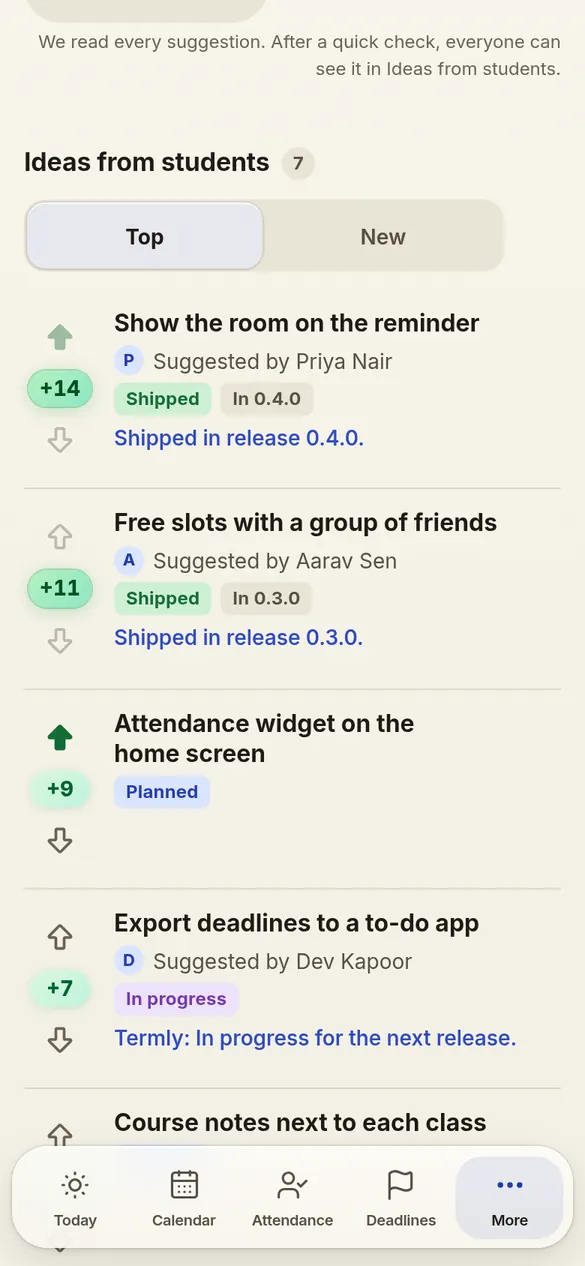
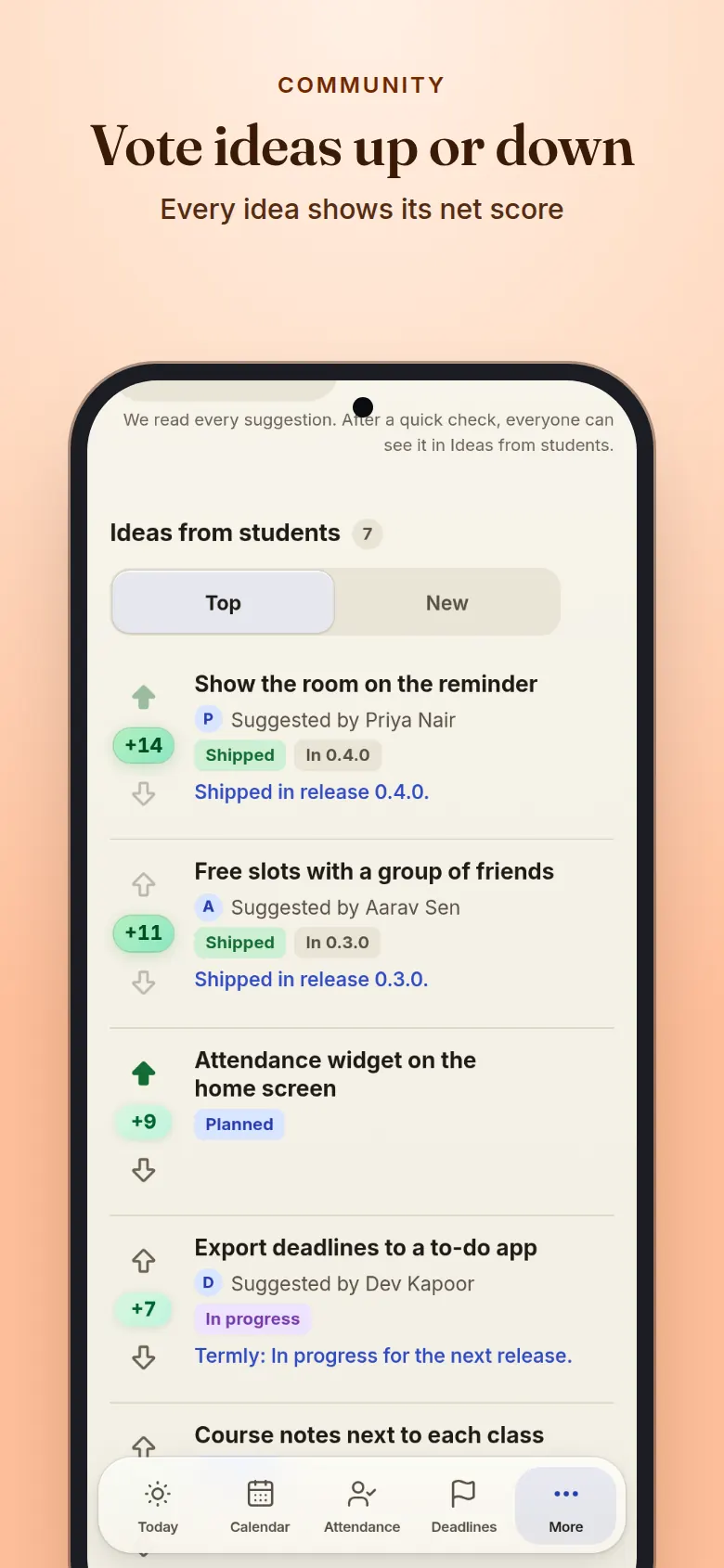
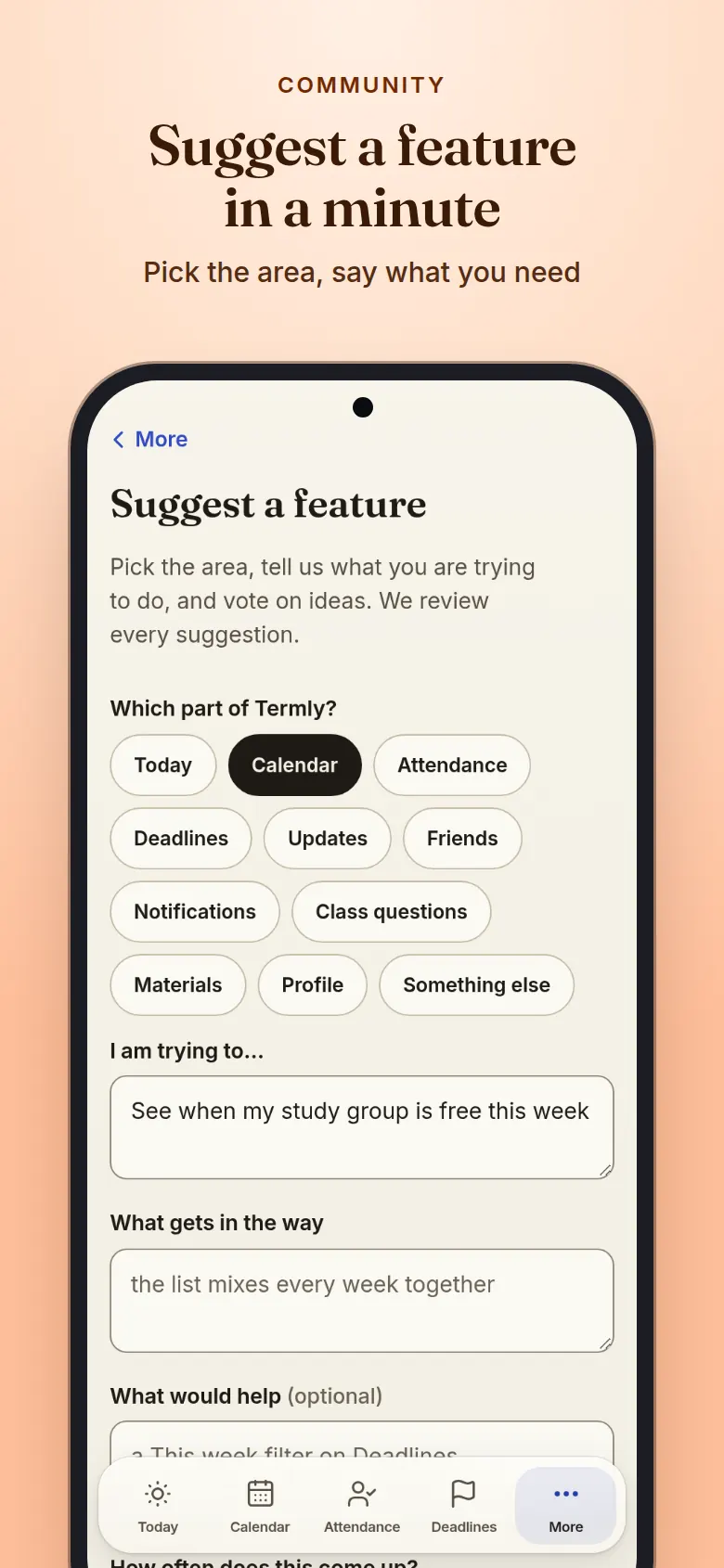
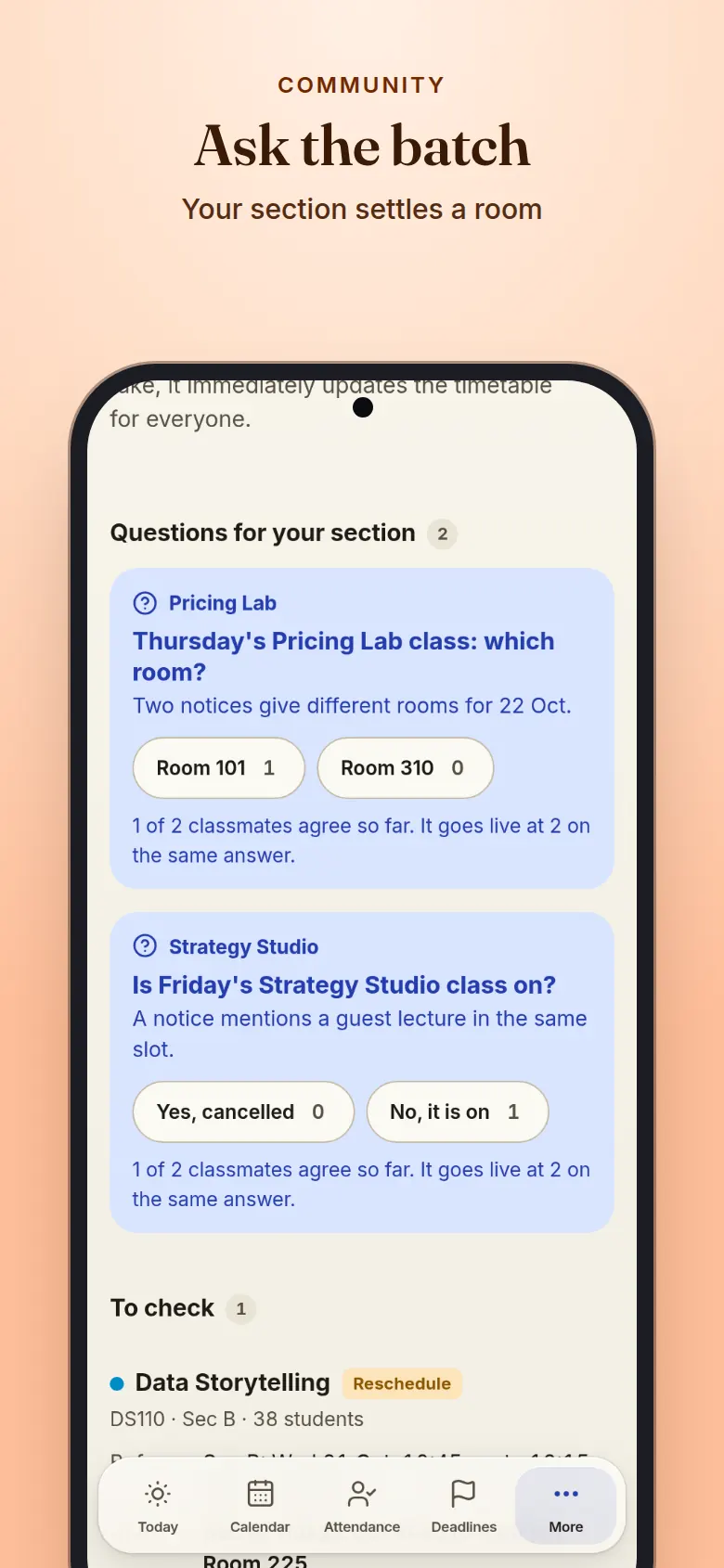
Suggest a feature by picking the area and saying what you are trying to do, then vote ideas up or down. When a room or a class is unclear, your section answers a short question and the answer applies once two agree.

  • A net score on every idea
  • Planned, in progress and shipped, in the open
  • Questions only go to the section they affect
Vote ideas up or down. Ideas from students with up and down arrows around each net score, and statuses: planned, in progress and shipped.

Materials, profile and features

Keep only what you use

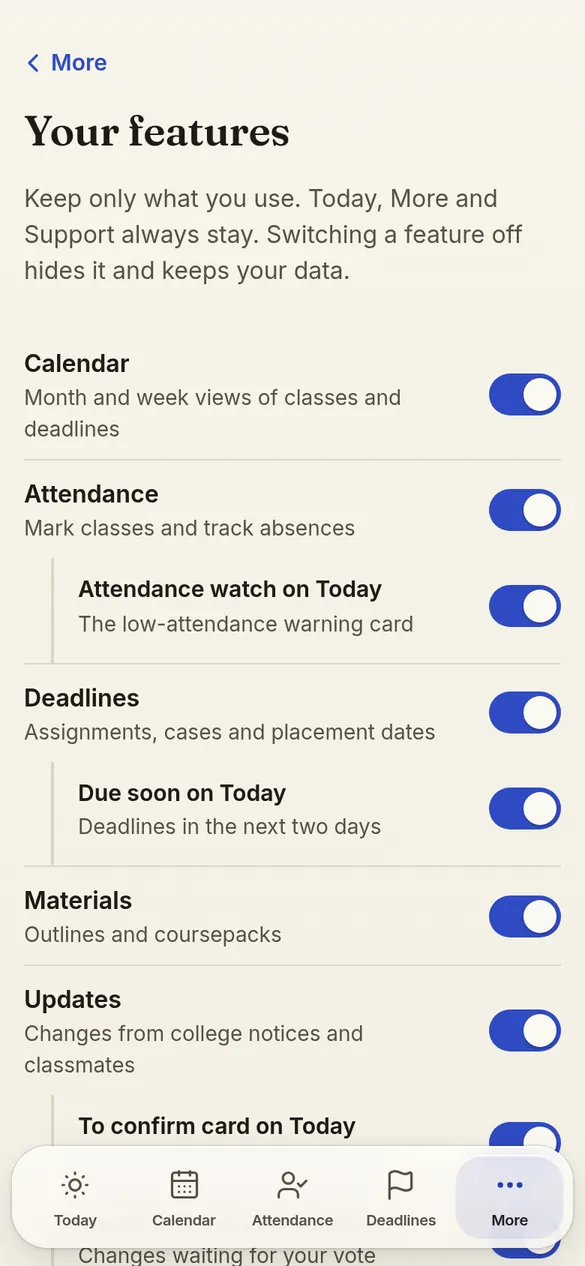
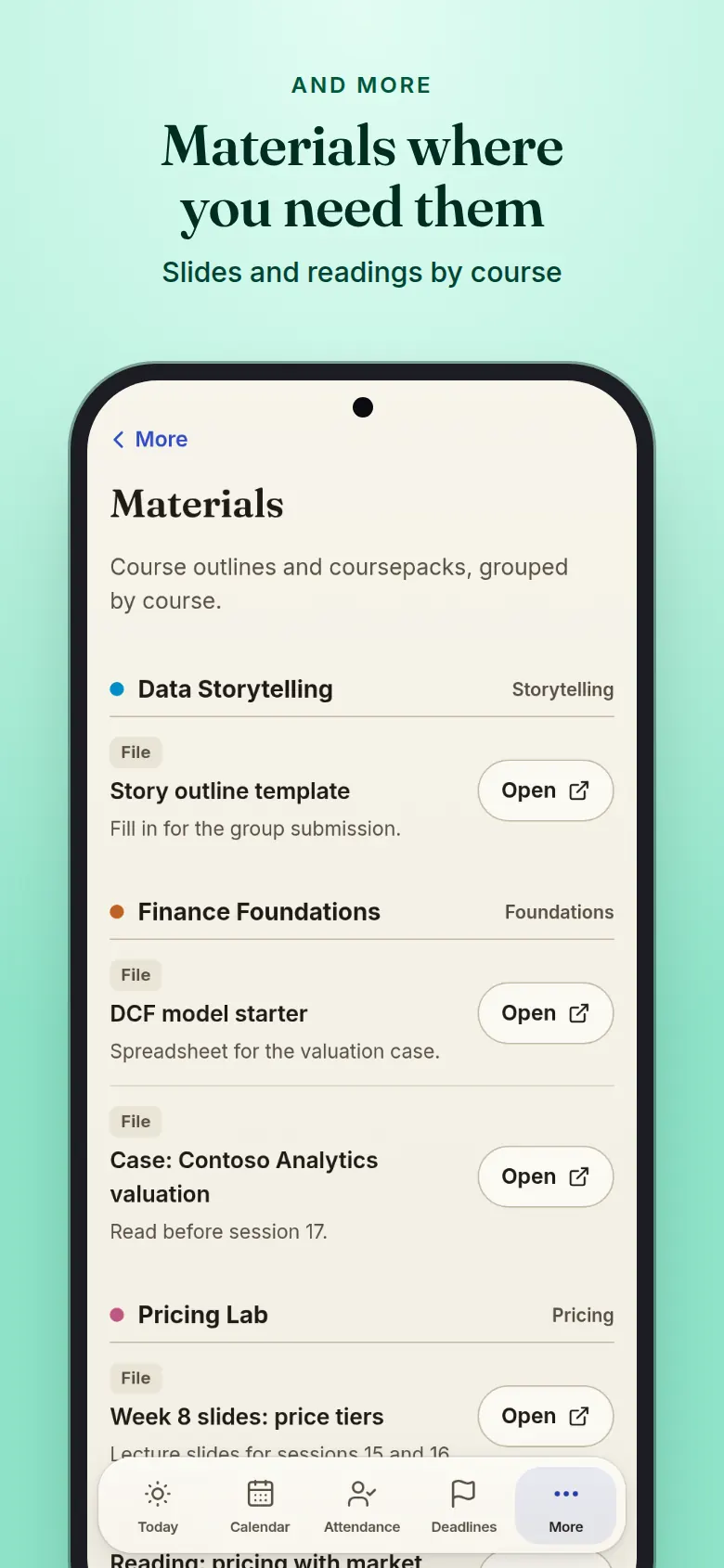
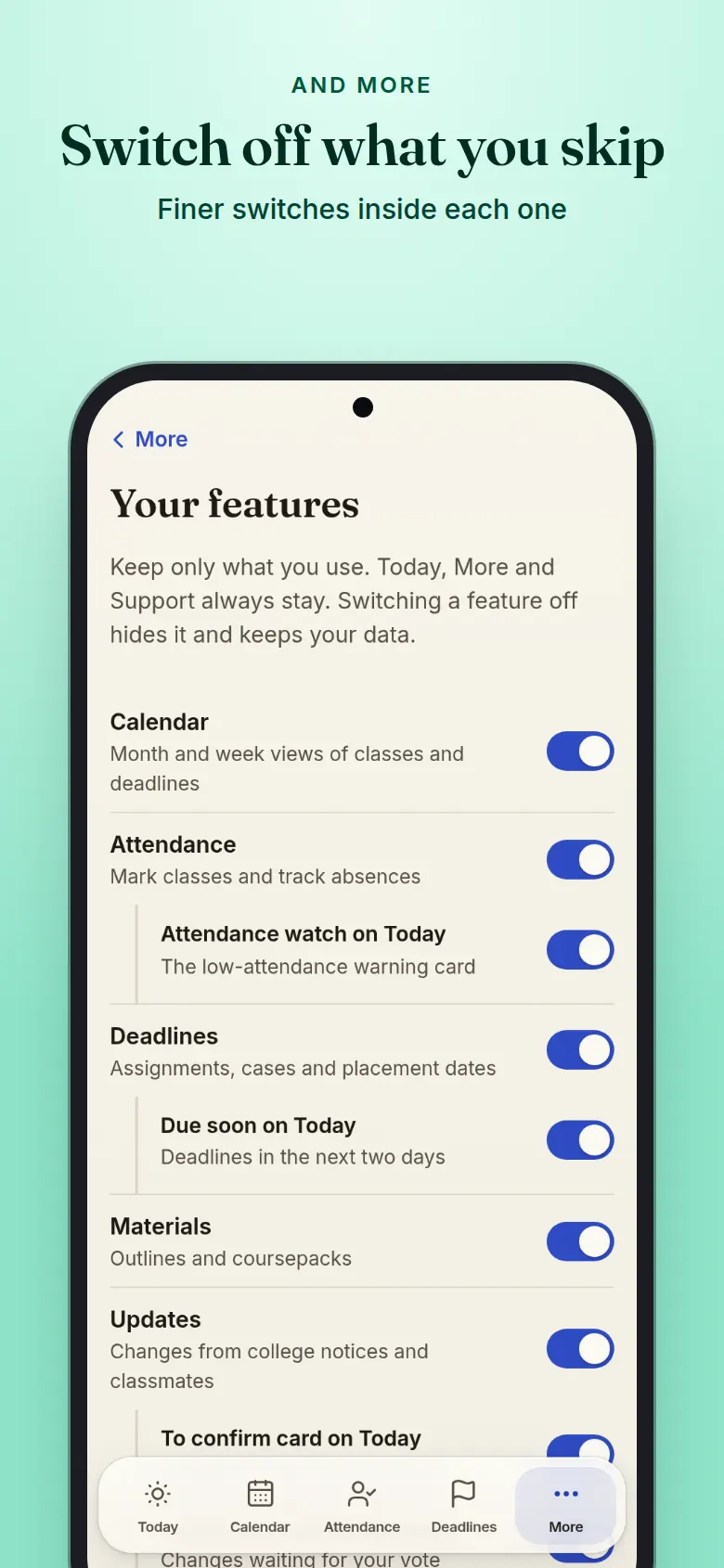
Course materials sit with the course, and your profile holds your sections, settings and mascot. Switch off any feature you skip; it hides from the app and your data stays.

  • Materials grouped by course
  • A mascot pick on Profile shows at once
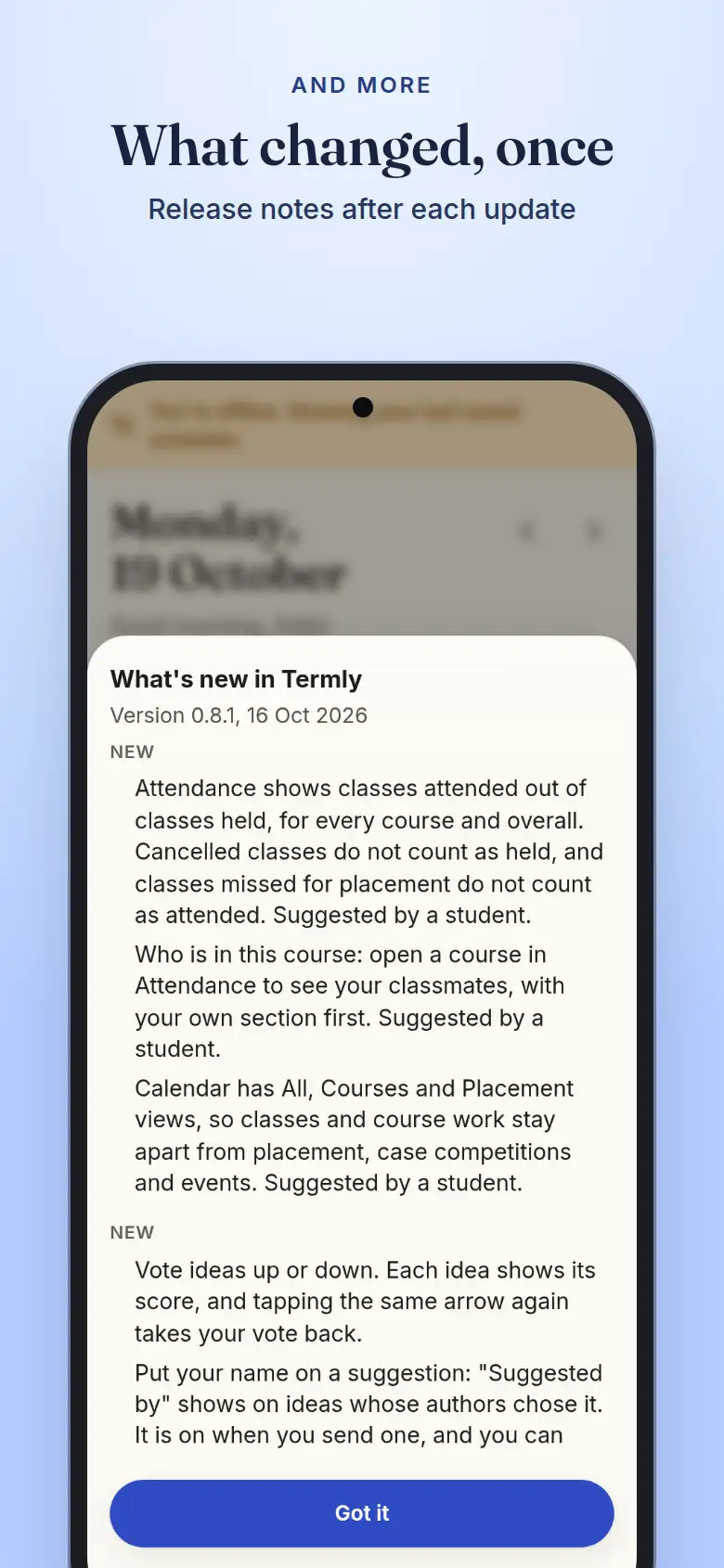
  • What's new opens once after each update
Switch off what you skip. Your features screen with a switch for each feature and option.

Data safety

What Termly can see, what it keeps, and what you control.

  • Gmail: read only, and needed

    Mail sync asks Google for read-only access and reads notices from listed college senders only. For a notice sent to a group, the cleaned text is kept for up to 30 days so a change can be checked, then deleted. Mail sent only to you is not kept. Termly also keeps the dates and titles it finds and the one sentence that backs each change. Signing in connects it. You can remove Termly's access in your Google Account any time; Termly then asks you to connect again.

  • Google Calendar: a link, nothing written

    Calendar sync is a private subscription link you add yourself. Termly never asks for Calendar or Drive access and writes nothing to your Google account.

  • What is stored

    Your attendance marks, ticks, personal deadlines and settings, on a private server. Marks and ticks not yet sent wait on your device until they sync, then live on the server too. Only you see them in the app. Nothing is sold or shared outside Termly.

  • Usage details are on during the beta

    Termly records screens opened, time spent, buttons used, errors and device type, linked to your account, to see what helps. Never mail text, what you type or your location. There is no switch for this during the beta.

  • Notifications are optional

    Nothing is sent until you turn notifications on for a device. Each kind of reminder has its own switch.

  • Friends see what you choose

    Sharing starts at class details. Switch to busy times only, or Off, in Friends. Nothing shows until a request is accepted.

  • No ads, no trackers on this page

    This page loads no scripts, fonts or images from anyone else, and sets no cookies.

  • Report an issue inside the app

    Use More, Support, or the flag on any class to report a wrong time or room.

Read all 13 notesThe same notes you accept when you first sign in
  1. Experimental

    Termly is an experimental project. It is provided as is, and its creator and operators accept no responsibility or liability for errors, missed classes or deadlines, data loss, downtime or any decision you make using it. Use it at your own risk.

  2. Unofficial

    Termly is an independent student project. It is not built, endorsed or operated by IIM Ranchi or its administration.

  3. Check the official source

    Timetables, reschedules, deadlines and attendance shown here are for personal planning only. Always confirm against official IIM Ranchi notices. Attendance figures are your own estimate, not the institute record.

  4. Who can sign in

    Only IIM Ranchi Google accounts are accepted. Sign-in uses Google with your name, email and profile picture only.

  5. Your courses

    Your courses and sections are matched from the institute's Term 5 section list using your name, and you confirm the match once. If it cannot be matched, you enter your roll number. Nobody can browse that list or see who else is in a section.

  6. Class timetables

    If Termly has no timetable yet for one of your sections, you may be asked to upload a screenshot of your standard timetable. An AI model reads the screenshot once to pick out days, times and rooms; the image is not kept. A section timetable goes live for everyone in it only after two different students submit matching timetables.

  7. Mail sync

    Mail sync is required and read-only. Signing in connects it, and Termly reads mail from a short list of college senders only (the MBA 2nd year office and the placement office): once back to the start of term, then new notices every hour from 8 am to 8 pm. Each notice is read once for everyone who got it. Its text is sent to an AI model to pick out dates. For a notice sent to a group, the cleaned text is kept for up to 30 days so a change can be checked and corrected, then deleted; mail sent only to you is not kept. Termly also keeps the sender, the subject of group notices, the dates and titles it finds, the one sentence that backs each change, and a fingerprint of the text (a hash that cannot be read back). You can remove Termly's access in your Google Account any time; Termly then asks you to connect again. Termly never requests Drive or Calendar access.

  8. Shared changes are community confirmed

    A reschedule, cancellation or course deadline found in a college notice is shown to everyone in that course or section, and placement notices to the whole batch, without saying whose mail it came from. A change goes live only after a student who received the notice supports it. Classmates in the course can support or object, and their first names are shown with their votes; when more object than support, the change is undone and an admin decides. By the community, for the community.

  9. Suggest a feature

    A suggestion you send is checked by an AI model, then everyone signed in to Termly can see it and vote it up or down. It shows your name only if you choose: the switch is on when you send it, and you can hide your name on it later. Suggestions sent before this change show no name.

  10. Your data

    Your attendance, ticks and personal deadlines are stored on a private server. Inside the app they are visible only to you; no other student can see them. There is no classmate directory and nothing is sold or shared outside Termly.

  11. How Termly uses data to improve

    Termly records how each signed-in student uses the app (screens opened, time spent, buttons used, errors, device and browser type) linked to their account, so the operator can see which features help and fix what does not. Never mail text, never what you type, never location. Raw records kept 180 days, daily summaries longer. During the beta this cannot be switched off.

  12. Calendar sync

    Syncing uses a private subscription link. Anyone holding that link can view your schedule, so do not share it. You can reset it any time. Google Calendar refreshes subscribed calendars on its own schedule, usually every 8 to 24 hours, so reschedules and cancellations can reach Google Calendar up to a day late. Termly always shows the latest; for same-day changes, check Termly.

  13. As is

    Free service with no warranty or uptime guarantee. You are responsible for the classes, deadlines and placement activities you attend or miss.

  1. 0.10.01 Nov 2026, 23 changes (latest)

    8 added9 improved6 fixed

    Added

    • Two ladders. Ranks run F, E, D, C, B, A, S, SS, SSS and EX; they show how much you contribute to the batch. Tiers run Copper, Bronze, Silver, Gold, Platinum, Diamond, Master and Grandmaster; they show how steadily you use Termly. Profile, How ranks work lists both with tonight's lines and what you need for the next step.
    • Tap a rank or tier chip for Why: on your own, how you got there and what is next; on someone else's, only the word, streaks and badges.
    • Helped the batch on Profile counts your answers, fixes and votes on ideas, with each rule, its points and its limit in How ranks work. Objecting earns the same as supporting, and nothing is ever taken away.
    • A first-week flow: a preview of your roster, a card after your first mark, a push reminder offer after it, and one Finish setting up card instead of several.
    • Your features is grouped by area, with Essentials and Everything presets and Undo. New switches cover the Finish setting up card, Class questions on Today, the Progress card, Who else is in this course, Class history and Suggest a feature. Nothing is ever hidden for you.
    • Classmates can be sorted by Most in common or A to Z, and each person shows the courses you share. Tap a profile photo to see it large and zoom.
    • Attendance history: change a past mark from the course's class list, with Undo.
    • Change log in More: what changed in Termly, newest first, with the releases below it. It updates every day.

    Improved

    • The ring round a photo shows the tier and the box round a card shows the rank, each with its own colour and a soft glow, in light and dark, and the chip always says the word. Badge colour themes are gone, since every rank and tier now has its own look.
    • Attendance shows your overall percentage in the green banner, and Held, Present, Absent, Placement and Not marked sit on one tidy row on a phone. A class missed for placement counts as held but not attended.
    • More: Report an issue and Suggest a feature are one Feedback row. Refresh app and Notifications now appear in More only. The profile card is tighter on a phone, and Profile no longer repeats your photo or tier badge.
    • Profile photos stay sharp when opened and on avatars. The Friend and Request sent tags are pills like the rank chips, and a classmate's profile no longer draws the rank mark behind the Friend button.
    • Sign-in links you to your roll by your college e-mail when it can, so most people skip the roll screen, and a name typed in a different order or with a middle name missing still matches.
    • The sign-in screen, More and About say who manages Termly, by first name.
    • Mail: tapping Scan while a scan is running waits for it and shows its result.
    • Dates and times follow Ranchi time (IST) wherever your phone is set, so today, this week, countdowns and the greeting stay right while travelling.
    • The offline and slow-server banner is a rounded card, and messages say device, not phone.

    Fixed

    • Report a problem, Shown twice, no longer says Invalid value; the report is accepted for a deadline shown on several sections.
    • Marks made offline no longer retry every moment; the wait grows and resets when you are back online. A device with a fast clock no longer shows every answer as saved data, and blocked browser storage no longer leaves a blank page.
    • Signing out waits for unsent changes that are seconds from saving, works when the browser blocks storage, and never shows the next student the previous student's saved answers.
    • Classmates: changing the sort no longer shows the old list under the wrong headings, and a long list no longer repeats a person or stops early.
    • Tiers, streaks and badges count only what you did in Termly, not marks imported from the old app.
    • Usage reports no longer drop events when the app is closed while one is sent.
  2. 0.9.931 Oct 2026, 1 change

    1 improved

    Improved

    • Gmail is now part of Termly: signing in connects your college Gmail (read-only), and Mail sync no longer has a Disconnect button. If Gmail is ever not connected, one screen connects it again. You can still remove Termly in your Google Account.
  3. 0.9.831 Oct 2026, 3 changes

    2 improved1 fixed

    Improved

    • Signing in with Google now also connects your college Gmail, so class and placement notices reach you with no extra step. Google shows what it asks for. Turning Gmail off in Mail sync keeps it off.
    • The Gmail reminder card on Today is gone.

    Fixed

    • Signing in no longer shows a server error when your connection drops partway.
  4. 0.9.730 Oct 2026, 3 changes

    2 improved1 fixed

    Improved

    • Scan now answers at once and follows the scan: it shows progress while your mail is read, joins a scan that is already running instead of showing an error, and ends by saying what was found, what is waiting for the next scan, or that it could not finish.
    • Updates opens faster when you open it from a link or reload it, and "Nothing to check" no longer flashes before a question appears.

    Fixed

    • Gmail can be connected again by every student.
  5. 0.9.427 Oct 2026, 4 changes

    1 added2 improved1 fixed

    Added

    • Mascots: pick a small drawn companion for your screens in Profile. Turn it off any time in Your features.

    Improved

    • Every deadline shows its course tag.
    • Signing out sends any marks and ticks not yet saved first, and asks before dropping any.

    Fixed

    • Materials show the Coursepack or Outline tag once, not again when the title already says it.
  6. 0.9.323 Oct 2026, 2 changes

    1 improved1 fixed

    Improved

    • Classmates, carried over attendance, materials upload and friend circles now match the look of the rest of the app.

    Fixed

    • The welcome card on Today wraps its text properly, has its close button at the top right and gets singular and plural counts right.
  7. 0.9.223 Oct 2026, 1 change

    1 improved

    Improved

    • The welcome card on Today can be closed, goes away on its own after a while, and only lists counts above zero.
  8. 0.9.123 Oct 2026, 8 changes

    7 added1 improved

    Added

    • Weekly todos: a weekly checklist card on Today.
    • Classmates: a searchable list under More of everyone in your batch, with Not on Termly yet for those who have not joined. Hide yourself from it in Profile.
    • Friend circles: put your friends into private named circles in Friends.
    • Mascots: eight hand-drawn ink creatures to pick from in Profile.
    • Coming from the old class group? A card lets you reconnect with the classmates you shared it with in one tap.
    • A welcome card on Today lists the records carried over for you, with a way to dispute them.
    • Attendance shows the counts carried over from before Termly for classes not matched yet.

    Improved

    • Each of these new features can be turned off in Your features.
  9. 0.9.016 Oct 2026, 1 change

    1 improved

    Improved

    • When the server is busy, Termly falls back to a backup route and tries again a few minutes later, so the app keeps working.
  10. 0.8.1222 Oct 2026, 1 change

    1 fixed

    Fixed

    • Materials shows only the courses you are enrolled in, and says Not available yet for a course with nothing uploaded.
  11. 0.8.921 Oct 2026, 1 change

    1 added

    Added

    • When sign-ups are closed, the sign-in screen says so and lets you join the waitlist.
  12. 0.8.819 Oct 2026, 1 change

    1 improved

    Improved

    • You accept the notes and terms once per account: no new prompt after an update, and the sign-in screen no longer lists them.
  13. 0.8.718 Oct 2026, 1 change

    1 added

    Added

    • A Made by credit link on the sign-in screen, More, About and the What is Termly? page.
  14. 0.8.617 Oct 2026, 1 change

    1 improved

    Improved

    • The What is Termly? page switches its screenshots between light and dark with a sliding sun and moon switch.
  15. 0.8.517 Oct 2026, 1 change

    1 fixed

    Fixed

    • A new version takes over as soon as it installs, so the What is Termly? page no longer opens the app on older copies.
  16. 0.8.417 Oct 2026, 1 change

    1 improved

    Improved

    • The What is Termly? page has fresh screenshots of the 0.8 features, in light and dark, with a Light and Dark switch.
  17. 0.8.317 Oct 2026, 1 change

    1 fixed

    Fixed

    • Release notes no longer name the student who suggested a feature; they say Suggested by a student.
  18. 0.8.217 Oct 2026, 4 changes

    1 added2 improved1 fixed

    Added

    • The What is Termly? page is rebuilt like an app store page: screenshots for phone and laptop, what is new, feature deep dives, data safety, version history and FAQ.

    Improved

    • The mail sync note says exactly what is kept: the subject, dates and titles and one supporting sentence, never the full mail.
    • What is new shows only the items that apply to you.

    Fixed

    • Attendance: only the Hide or Show classes arrow turns when opened, not the classmates icon.
  19. 0.8.116 Oct 2026, 3 changes

    3 added

    Added

    • Attendance shows classes attended out of classes held, for every course and overall. Cancelled classes do not count as held, and classes missed for placement do not count as attended. Suggested by a student.
    • Who is in this course: open a course in Attendance to see your classmates, with your own section first. Suggested by a student.
    • Calendar has All, Courses and Placement views, so classes and course work stay apart from placement, case competitions and events. Suggested by a student.
  20. 0.8.016 Oct 2026, 3 changes

    2 added1 improved

    Added

    • Vote ideas up or down. Each idea shows its score, and tapping the same arrow again takes your vote back.
    • Put your name on a suggestion: "Suggested by" shows on ideas whose authors chose it. It is on when you send one, and you can hide it on your own ideas any time.

    Improved

    • Suggestions go public as soon as a quick check is done, so classmates can see them sooner.
  21. 0.7.016 Oct 2026, 4 changes

    1 added3 improved

    Added

    • Find friends by name: search for a classmate in Friends and send a request. Nothing shows until they accept. Friend codes are gone.

    Improved

    • Prefer not to be found? Turn on Hide me from search in Friends. You can still send and accept requests.
    • Your features now has finer switches inside each feature, such as the attendance card, due soon and friends free now on Today, and the friends overlay on Calendar.
    • A new floating glass look, with a roomier tab bar.
  22. 0.6.015 Oct 2026, 2 changes

    1 added1 improved

    Added

    • Suggest a feature: pick the area, tell us what you are trying to do, and vote on ideas. We review every suggestion.

    Improved

    • Usage details help us improve Termly during the beta and are always on. See About for what is recorded.
  23. 0.5.115 Oct 2026, 1 change

    1 added

    Added

    • What is Termly? A page with every feature, screenshots and all the release notes, to share with friends. Find it on the sign-in screen and in About.
  24. 0.5.015 Oct 2026, 5 changes

    1 added4 improved

    Added

    • Suggest a feature: send an idea from More, follow what happens to it, and vote for planned ideas from other students.

    Improved

    • Tab rows and switches no longer squeeze or overlap on a phone; they scroll sideways and keep the chosen one in view.
    • Long numbers and labels wrap neatly instead of leaving single words on a line.
    • The calendar preview in Calendar sync gives every class enough room for its name and time.
    • Buttons on banners and sheets are easier to tap, and nothing hides under the iPhone home bar or notch.
  25. 0.4.015 Oct 2026, 5 changes

    4 added1 improved

    Added

    • Reminders before class and deadlines, 15 minutes by default. Change or switch off in More, Notifications.
    • Alerts when a class is cancelled, moved or changes room.
    • Choose what to get: classes, deadlines, quizzes and exams, schedule changes, friends and placement, with your own lead time and quiet hours.
    • Mute reminders for one course: press and hold a class, or switch the course off in More, Notifications.

    Improved

    • On iPhone, Termly explains how to add it to the Home Screen, which iOS needs before it shows reminders.
  26. 0.3.015 Oct 2026, 12 changes

    4 added5 improved3 fixed

    Added

    • Friends on your calendar: tap Friends in the Calendar header to see their classes beside yours.
    • Free together: pick friends and a day to see when you are all free.
    • Friends free now on Today, and initials of friends who share a class with you.
    • Refresh app in More, and pull down on Today, Calendar, Attendance or Updates for fresh data.

    Improved

    • Changes show up live: class changes, updates and friend requests appear without a refresh.
    • Taps respond at once: attendance, votes and friend actions no longer wait for the server.
    • Quizzes, deadlines and class changes from college mail now go straight to your schedule.
    • Connecting Gmail is now the first step, since it keeps your timetable up to date.
    • Timetable sharing with friends is on by default. You can switch it off in Friends.

    Fixed

    • Classes remaining now counts from the 20-class quota, so cancelled classes no longer shrink it.
    • A class that makes up for a cancelled one now says "Rescheduled from" instead of "Extra class".
    • Updates that 2 or more classmates mark incorrect are taken down and sent for review.
  27. 0.2.015 Oct 2026, 22 changes

    11 added9 improved2 fixed

    Added

    • Sign in with Google first, then accept the notes once, with a sticky accept bar.
    • Mail sync: connect Gmail, review the updates it finds and change their tags; shared changes are checked by the community first.
    • Onboarding: pick your courses, upload your section timetable and report a class.
    • Friends: opt in, add each other by code, see friends on your calendar, hide one friend and find free time together.
    • Open questions: ask your section, and the answer goes live once enough classmates agree. Open questions sit in one card on Today.
    • Community updates, Report a problem and a calendar category picker.
    • The sign-in screen lists what Termly does, and Termly reminds you to install it.
    • Your features: turn single features on or off.
    • Live updates: changes from the server show up without a refresh.
    • A Refresh app button, pull to refresh, a Showing saved data pill and a bar when a new version is ready.
    • A link preview card when you share Termly in a chat app.

    Improved

    • The app is now called Termly, and it says term instead of semester.
    • Screens open from saved data first and changes save at once, then sync in the background.
    • Attendance counts remaining classes from the quota rules, shows cancelled classes, and says Rescheduled from for a make-up class.
    • Calendar course chips and short course names on filter chips and labels.
    • Deadlines from earlier days fold behind one tap, and Today shows only what is overdue from today.
    • Today asks you to connect Gmail before calendar sync, with a daily reminder to sync.
    • Clearer privacy notes on how Termly uses and improves with your data, and a note that Google Calendar can lag.
    • Termly checks for an update when you return to it and every hour.
    • A polish pass across the screens.

    Fixed

    • The accept bar is no longer hidden by cookie notice filters in Brave.
    • The Google sign-in button frame in dark mode, and names in title case.
  28. 0.1.015 Oct 2026, 1 change

    1 added

    Added

    • The first Termly app: an installable web app rebuilt from scratch.

Questions

How do I install it on Android?

Open termly-iimr.vercel.app in Chrome, tap the menu (three dots, top right), then Add to Home screen and Install.

Termly opens from its icon like any app. No store needed.

How do I install it on iPhone?

Open termly-iimr.vercel.app in Safari, tap Share, scroll down and tap Add to Home Screen, then Add.

On iPhone, reminders work only from the installed app.

Does it work offline?

Partly. Termly opens with your last saved schedule and deadlines, and a banner says when you are looking at the saved copy.

Attendance marks and deadline ticks made without a signal wait on your device, shown as Waiting to sync, and send themselves when Termly is reachable again. Things that need the server, like mail sync, friends and ideas, need a connection.

Why does it feel so fast?

Attendance marks and deadline ticks show the moment you tap, with Undo for 5 seconds and no wait for the network. A mascot pick on Profile shows at once too.

Screens paint from the copy saved on your device first and refresh in the background, so slow campus Wi-Fi does not hold you up.

Where does the data come from?

Your courses and sections come from the institute's section list, matched to your name, and you confirm them once.

Changes come from college notices, read from the mailboxes of students who connect Gmail. Once confirmed, a change applies to everyone in that course or section.

Who confirms an update?

A change found in a notice goes live only after a student who received that notice supports it. Classmates in the course can support or object; when more object than support, the change is undone and sent for review.

How do friends work?

Search for a classmate by full name and send a request. Nothing shows until they accept. A friend sees your first name and the courses you share, and your timetable as you choose: class details, busy times only, or off. Either of you can remove the link any time.

What notifications will I get?

None until you turn them on for your device. Then a reminder 15 minutes before each class and deadline by default, and alerts for cancelled, moved or room-changed classes. Change the lead time, set quiet hours or switch any kind off in More, Notifications.

How do I report a bug or a wrong class?

Tap the flag on any class to report a wrong time or room; when two classmates agree, the fix applies to the whole section. For anything else, open More, Support inside the app.